Authentication and Authorization
Authentication answers “who is calling?”. Authorization answers “what may they do?”. ASP.NET Core keeps these as two separate middleware components. The result of authentication is a ClaimsPrincipal, which is a user described by a list of key-value claims.
The code on this page has not been compiled or run yet. It targets .NET 11 and C# 15.
1. How a JWT Request Works
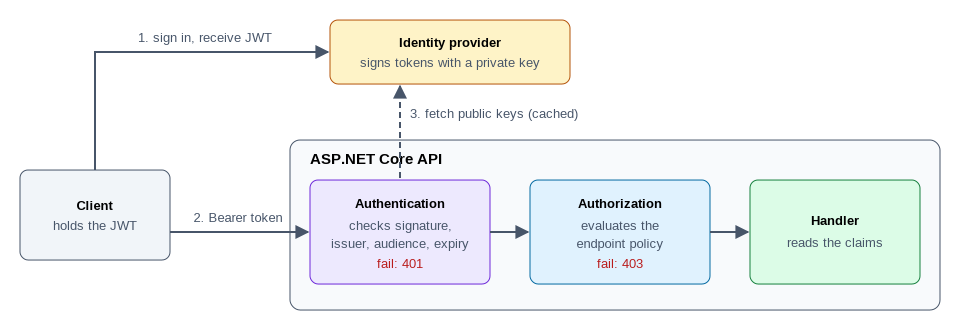
A JWT (JSON Web Token) is a signed token that holds claims. The API validates the signature with the public keys of the identity provider, so it does not need a database lookup.
2. Choose a Method
| Client | Recommended method |
|---|---|
| Browser SPA on the same site | HTTP-only cookie |
| Browser SPA with an external identity provider | OIDC with a backend-for-frontend, then a cookie |
| Mobile app or service-to-service | JWT bearer token |
| Server-rendered pages | Cookie |
Do not store long-lived tokens in localStorage, because any XSS (cross-site scripting) bug can read them.
3. Validate JWTs
dotnet add package Microsoft.AspNetCore.Authentication.JwtBearerusing Microsoft.AspNetCore.Authentication.JwtBearer;
builder.Services
.AddAuthentication(JwtBearerDefaults.AuthenticationScheme)
.AddJwtBearer(options =>
{
options.Authority = builder.Configuration["Auth:Authority"];
options.Audience = builder.Configuration["Auth:Audience"];
options.MapInboundClaims = false;
});
builder.Services.AddAuthorization();
var app = builder.Build();
app.UseAuthentication();
app.UseAuthorization();Authority is the identity provider URL. The handler downloads its signing keys automatically. MapInboundClaims = false keeps standard claim names such as sub, rather than renaming them to long XML-style URIs.
4. Protect Endpoints
using System.Security.Claims;

var items = app.MapGroup("/items").RequireAuthorization();

items.MapGet("/", ListItems).AllowAnonymous();

items.MapGet("/mine", (ClaimsPrincipal user) =>
{
    var userId = user.FindFirstValue("sub");
    return TypedResults.Ok(new { userId });
});
Make authentication the default. New endpoints are then protected even when someone forgets to add a rule.
builder.Services.AddAuthorizationBuilder()
    .SetFallbackPolicy(new AuthorizationPolicyBuilder()
        .RequireAuthenticatedUser()
        .Build());
Mark public endpoints with .AllowAnonymous().
| Response | Meaning |
|---|---|
401 Unauthorized |
The caller is not authenticated |
403 Forbidden |
The caller is known but lacks permission |
5. Policies
A policy is a named set of requirements. Prefer policies over checks for role names in handlers.
builder.Services.AddAuthorizationBuilder()
    .AddPolicy("admin", policy => policy.RequireRole("admin"))
    .AddPolicy("verified", policy => policy.RequireClaim("email_verified", "true"))
    .AddPolicy("items:write", policy => policy.RequireAssertion(context =>
        context.User.FindFirst("scope")?.Value.Split(' ').Contains("items:write") == true));

items.MapPost("/", CreateItem).RequireAuthorization("items:write");
The standard scope claim is one space-separated string, so RequireClaim("scope", "items:write") fails when a token has several scopes. The assertion above splits the value first.
7. ASP.NET Core Identity
Identity is the built-in user system. It stores users, password hashes, roles and lockouts in your database. Use it when your app owns its user accounts.
dotnet add package Microsoft.AspNetCore.Identity.EntityFrameworkCoreusing Microsoft.AspNetCore.Identity;
using Microsoft.AspNetCore.Identity.EntityFrameworkCore;
public sealed class AppUser : IdentityUser;
public sealed class AppDbContext(DbContextOptions<AppDbContext> options)
: IdentityDbContext<AppUser>(options);builder.Services.AddAuthorization();
builder.Services
.AddIdentityApiEndpoints<AppUser>()
.AddEntityFrameworkStores<AppDbContext>();
var app = builder.Build();
app.MapGroup("/account").MapIdentityApi<AppUser>();MapIdentityApi adds register, login, refresh, password reset and two-factor endpoints. Its bearer tokens are opaque tokens, not JWTs, and only this app can read them.
9. Compared With Django
| Django and DRF | ASP.NET Core |
|---|---|
django.contrib.auth |
ASP.NET Core Identity |
request.user |
ClaimsPrincipal |
IsAuthenticated |
RequireAuthorization() |
AllowAny |
AllowAnonymous() |
DEFAULT_PERMISSION_CLASSES |
SetFallbackPolicy |
has_object_permission |
AuthorizationHandler<TRequirement, TResource> |
simplejwt |
JwtBearer for validation, and an identity provider to issue tokens |
django-allauth |
External authentication handlers, or an identity provider |
10. Common Mistakes
| Mistake | What goes wrong | Do this instead |
|---|---|---|
| Authorization before authentication | All users are anonymous | Put authentication first |
| No fallback policy | A new endpoint is public by accident | Set SetFallbackPolicy |
| Disabling token validation to fix an error | Forged tokens are accepted | Fix the issuer or audience setting |
| Trusting a user ID from the request body | One user can act as another | Read it from the claims |
| Checking only the route, not the record | Users can read each other’s records | Add resource-based authorization |
Long-lived tokens in localStorage |
XSS can steal them | Use HTTP-only cookies |