Entity Framework Core
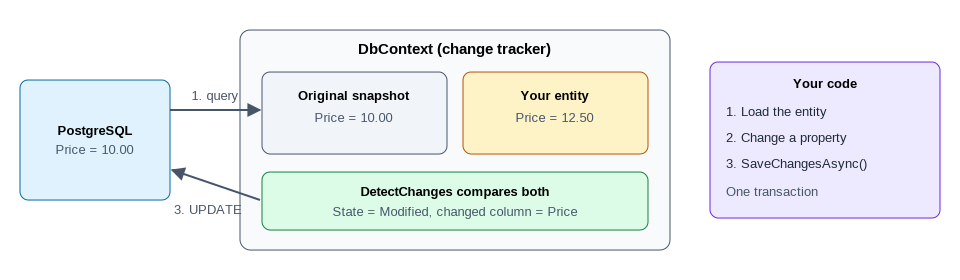
Entity Framework Core (EF Core) maps C# classes to database tables. It fills the role of the Django ORM, but it works differently in one major way. A DbContext tracks loaded objects and writes all changes together when you call SaveChangesAsync.
The code on this page has not been compiled or run yet. It targets .NET 11 and C# 15.
1. Setup With PostgreSQL
dotnet add package Npgsql.EntityFrameworkCore.PostgreSQL
dotnet add package Microsoft.EntityFrameworkCore.Design
dotnet tool install --global dotnet-efbuilder.Services.AddDbContext<AppDbContext>(options =>
options.UseNpgsql(builder.Configuration.GetConnectionString("Default")));AddDbContext registers the context as a scoped service, so each request receives its own instance.
2. Entities and DbContext
public sealed class Category
{
    public int Id { get; set; }
    public required string Name { get; set; }
    public List<Item> Items { get; set; } = [];
}

public sealed class Item
{
    public int Id { get; set; }
    public required string Name { get; set; }
    public decimal Price { get; set; }
    public DateTimeOffset CreatedAt { get; set; } = DateTimeOffset.UtcNow;

    public int CategoryId { get; set; }
    public Category Category { get; set; } = null!;
}

public sealed class AppDbContext(DbContextOptions<AppDbContext> options) : DbContext(options)
{
    public DbSet<Item> Items => Set<Item>();
    public DbSet<Category> Categories => Set<Category>();

    protected override void OnModelCreating(ModelBuilder model)
    {
        model.ApplyConfigurationsFromAssembly(typeof(AppDbContext).Assembly);
    }
}
Keep the mapping in a configuration class:
using Microsoft.EntityFrameworkCore.Metadata.Builders;

public sealed class ItemConfiguration : IEntityTypeConfiguration<Item>
{
    public void Configure(EntityTypeBuilder<Item> item)
    {
        item.Property(i => i.Name).HasMaxLength(100);
        item.Property(i => i.Price).HasPrecision(12, 2);
        item.HasIndex(i => i.Name).IsUnique();

        item.HasOne(i => i.Category)
            .WithMany(c => c.Items)
            .HasForeignKey(i => i.CategoryId)
            .OnDelete(DeleteBehavior.Restrict);
    }
}
3. Migrations
dotnet ef migrations add AddItems
dotnet ef database update
dotnet ef migrations script --idempotent -o migrate.sql
dotnet ef migrations bundle -o efbundle| Django | EF Core |
|---|---|
makemigrations |
dotnet ef migrations add Name |
migrate |
dotnet ef database update |
sqlmigrate |
dotnet ef migrations script |
showmigrations |
dotnet ef migrations list |
Read each generated migration before you apply it. A renamed column can appear as a drop and an add, which loses data. Replace those two operations with RenameColumn.
For production, run the idempotent script or the bundle as a deployment step. Do not call Database.Migrate() at startup, because several replicas can start at the same time.
4. Query With LINQ
A query runs only when you call a terminal method such as ToListAsync.
var items = await db.Items
    .AsNoTracking()
    .Where(i => i.Price > 10m && i.Category.Name == "Office")
    .OrderByDescending(i => i.CreatedAt)
    .Take(20)
    .Select(i => new ItemResponse(i.Id, i.Name, i.Price, i.Category.Name))
.ToListAsync(ct);| Django ORM | EF Core |
|---|---|
Item.objects.filter(price__gt=10) |
db.Items.Where(i => i.Price > 10) |
.get(pk=1) |
.SingleAsync(i => i.Id == 1) |
.first() |
.FirstOrDefaultAsync() |
.exists() |
.AnyAsync() |
.count() |
.CountAsync() |
.values("id", "name") |
.Select(i => new { i.Id, i.Name }) |
.select_related("category") |
.Include(i => i.Category) |
.prefetch_related("items") |
.Include(c => c.Items).AsSplitQuery() |
.annotate(n=Count("items")) |
.Select(c => new { c.Name, N = c.Items.Count }) |
5. Change Tracking
var item = await db.Items.SingleAsync(i => i.Id == id, ct);
item.Price = 12.50m;

db.Items.Add(new Item { Name = "Pen", Price = 2m, CategoryId = 1 });

await db.SaveChangesAsync(ct);
SaveChangesAsync detects the changed properties and runs the UPDATE and INSERT in one transaction. There is no item.save() call.
| Entity state | SaveChangesAsync runs |
|---|---|
Added |
INSERT |
Modified |
UPDATE for the changed columns |
Deleted |
DELETE |
Unchanged |
Nothing |
Detached |
Nothing, because EF Core does not track it |
Use AsNoTracking on read-only queries. It uses less memory and runs faster.
6. Bulk Operations
These methods run one SQL statement and skip the change tracker. They are the equivalent of QuerySet.update() and QuerySet.delete().
await db.Items
    .Where(i => i.CategoryId == 3)
    .ExecuteUpdateAsync(set => set.SetProperty(i => i.Price, i => i.Price * 1.1m), ct);

await db.Items
    .Where(i => i.CreatedAt < cutoff)
    .ExecuteDeleteAsync(ct);
7. Avoid the N+1 Problem
Lazy loading is off by default. A navigation property that you did not load is empty, so a missing Include often produces wrong data rather than extra queries.
// Best for APIs: fetch only the columns you need
var rows = await db.Categories
    .AsNoTracking()
    .Select(c => new { c.Name, Items = c.Items.Select(i => i.Name).ToList() })
    .ToListAsync(ct);

// Use Include when you will modify the loaded graph
var category = await db.Categories
    .Include(c => c.Items)
    .AsSplitQuery()
    .SingleAsync(c => c.Id == id, ct);
AsSplitQuery loads a collection with a second SQL query. It prevents the row explosion that one large JOIN can cause.
Log SQL during development to see what EF Core runs:
{
  "Logging": {
    "LogLevel": {
      "Microsoft.EntityFrameworkCore.Database.Command": "Information"
    }
  }
}
8. Transactions and Concurrency
One SaveChangesAsync call is already a transaction. Start an explicit transaction only when several calls must succeed together.
await using var tx = await db.Database.BeginTransactionAsync(ct);

db.Orders.Add(order);
await db.SaveChangesAsync(ct);

await db.Items
    .Where(i => i.Id == order.ItemId)
    .ExecuteUpdateAsync(set => set.SetProperty(i => i.Stock, i => i.Stock - 1), ct);

await tx.CommitAsync(ct);
Optimistic concurrency detects two users who edit the same row. PostgreSQL provides the xmin system column for this purpose.
public uint Version { get; set; }

item.Property(i => i.Version).IsRowVersion();
A stale update then throws DbUpdateConcurrencyException. Catch it and return 409 Conflict.
9. Raw SQL and Dapper
Interpolated values become SQL parameters, so this query is safe from SQL injection:
var items = await db.Items
    .FromSql($"SELECT * FROM \"Items\" WHERE \"Name\" ILIKE {pattern}")
    .AsNoTracking()
    .ToListAsync(ct);
Use Dapper for a hand-tuned report query. It maps SQL results to objects and adds almost no overhead.
For vector search, the Pgvector.EntityFrameworkCore package adds the pgvector column type and distance functions.
10. Common Mistakes
| Mistake | What goes wrong | Do this instead |
|---|---|---|
Sharing a DbContext across threads |
Exceptions or corrupted state | Use one per request or scope |
ToList() before Where |
The table loads into memory | Filter before the terminal method |
| Tracking large read-only results | High memory use | Use AsNoTracking or Select |
Missing Include |
Related data is empty | Project with Select or add Include |
| Migrating at app startup | Replicas race each other | Migrate in a deployment step |
| Ignoring the generated migration | Silent data loss | Review it before you apply it |