Dependency Injection
Dependency injection (DI) means that a class declares what it needs, and the framework supplies it. ASP.NET Core is built around one DI container. Django has no direct equivalent, so this is one of the most important new ideas to learn.
The code on this page has not been compiled or run yet. It targets .NET 11 and C# 15.
1. Why It Exists
A class that creates its own dependencies is hard to test and hard to change. A class that receives them through its constructor can run with a fake in a test.
public interface IEmailSender
{
    Task SendAsync(string to, string subject, CancellationToken ct);
}

public sealed class WelcomeService(IEmailSender email)
{
    public Task WelcomeAsync(string address, CancellationToken ct) =>
        email.SendAsync(address, "Welcome", ct);
}
WelcomeService depends on the interface. It does not know which email provider runs behind it.
2. Register and Consume
Register each service in Program.cs:
builder.Services.AddSingleton<IEmailSender, SmtpEmailSender>();
builder.Services.AddScoped<WelcomeService>();
Consume a service by naming it as a parameter:
app.MapPost("/welcome", async (string address, WelcomeService service, CancellationToken ct) =>
{
    await service.WelcomeAsync(address, ct);
    return TypedResults.NoContent();
});
The container builds the whole graph. It creates SmtpEmailSender, passes it to WelcomeService, and passes that to the handler.
3. The Three Lifetimes
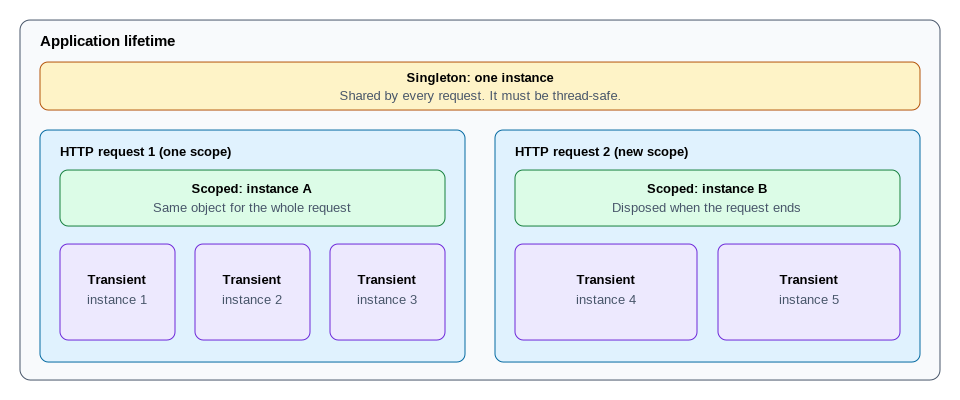
| Lifetime | Instances | Use it for | Must be thread-safe? |
|---|---|---|---|
AddSingleton |
One for the application | Caches, HttpClient factories, configuration |
Yes |
AddScoped |
One per HTTP request | DbContext, the current user, a unit of work |
Normally no |
AddTransient |
One per injection | Small stateless helpers | Normally no |
Choose the lifetime with these questions, in order:
- Does the service hold per-request state or a
DbContext? Use scoped. - Is the service expensive to create, and is it thread-safe? Use singleton.
- Is it small and stateless? Use transient.
4. The Captive Dependency Bug
A service must not depend on a service with a shorter lifetime. A singleton that receives a scoped service keeps it for the life of the application. The scoped service becomes captive.
// Wrong: one DbContext is shared by every request, on many threads
public sealed class BadCache(AppDbContext db) { }

builder.Services.AddSingleton<BadCache>();| Consumer | Can use singleton | Can use scoped | Can use transient |
|---|---|---|---|
| Singleton | Yes | No | Only if the transient is safe to keep for the app lifetime |
| Scoped | Yes | Yes | Yes |
| Transient | Yes | Yes | Yes |
The container checks for this error in the Development environment and throws at startup. Enable the same check in every environment:
builder.Host.UseDefaultServiceProvider(options =>
{
    options.ValidateScopes = true;
    options.ValidateOnBuild = true;
});
5. Create a Scope Yourself
A singleton or background worker has no request scope. Create one for each unit of work:
public sealed class ReportWorker(IServiceScopeFactory scopes) : BackgroundService
{
    protected override async Task ExecuteAsync(CancellationToken stoppingToken)
    {
        using var timer = new PeriodicTimer(TimeSpan.FromMinutes(5));

        while (await timer.WaitForNextTickAsync(stoppingToken))
        {
            await using var scope = scopes.CreateAsyncScope();
            var db = scope.ServiceProvider.GetRequiredService<AppDbContext>();
            await db.Items.CountAsync(stoppingToken);
        }
    }
}
The DbContext is disposed when the scope ends.
6. Registration Patterns
| Pattern | Code |
|---|---|
| Interface to implementation | services.AddScoped<IStore, SqlStore>(); |
| Concrete class | services.AddScoped<ItemService>(); |
| Factory | services.AddSingleton<IClock>(_ => new SystemClock()); |
| Existing instance | services.AddSingleton(TimeProvider.System); |
| Register only if absent | services.TryAddScoped<IStore, SqlStore>(); |
Register several implementations to receive all of them:
builder.Services.AddScoped<INotifier, EmailNotifier>();
builder.Services.AddScoped<INotifier, SmsNotifier>();

public sealed class Broadcast(IEnumerable<INotifier> notifiers) { }
Keyed services select one implementation by name:
builder.Services.AddKeyedSingleton<IStorage, S3Storage>("s3");
builder.Services.AddKeyedSingleton<IStorage, LocalStorage>("local");

public sealed class Uploads([FromKeyedServices("s3")] IStorage storage) { }
7. HttpClient
Do not create a new HttpClient for each call, because that can exhaust sockets. Register a typed client through IHttpClientFactory:
builder.Services.AddHttpClient<WeatherClient>(client =>
{
    client.BaseAddress = new Uri("https://api.example.com/");
    client.Timeout = TimeSpan.FromSeconds(10);
});

public sealed class WeatherClient(HttpClient http)
{
    public Task<string> TodayAsync(CancellationToken ct) =>
        http.GetStringAsync("today", ct);
}
8. Replace a Service in a Test
DI makes integration tests simple. Replace one registration and keep the rest of the app:
factory.WithWebHostBuilder(builder =>
    builder.ConfigureTestServices(services =>
    {
        services.RemoveAll<IEmailSender>();
        services.AddSingleton<IEmailSender, FakeEmailSender>();
    }));
9. Compared With Python
| Python | ASP.NET Core |
|---|---|
| Module-level instance | Singleton |
FastAPI Depends(get_db) |
Scoped service |
unittest.mock.patch |
Replace the registration |
Django request.user |
A scoped service or ClaimsPrincipal parameter |
10. Common Mistakes
| Mistake | What goes wrong | Do this instead |
|---|---|---|
| Injecting scoped into singleton | Stale state and thread-safety failures | Use IServiceScopeFactory |
Calling GetRequiredService everywhere |
Dependencies are hidden | Use constructor injection |
| Forgetting a registration | The app throws when it resolves the service | Keep ValidateOnBuild on |
| Adding an interface for every class | Extra code with no benefit | Add one when you need a second implementation or a fake |
| Storing request data in a singleton | Users see each other’s data | Use a scoped service |