Everything to know about turning pictures into geometry: the two very different problems that share the name, the mid-2026 model landscape, why the metrics lie about the back of the object, and runnable code that fits on a 12 GB card.
Author
Benedict Thekkel
1. What is Image-to-3D?
“Image-to-3D” is the Hugging Face pipeline tag for any model that takes pixels in and emits geometry out. That single tag hides two problems that share almost nothing - different inputs, different methods, different failure modes, and metrics that are not even comparable. Conflating them is the single most common confusion in this area, so this notebook is organised around the split:
A. Multi-view reconstruction
B. Single-image 3D generation
Input
many images (10s to 100s) of one scene/object
one image (or 2-4)
The 3D is
measured - the images constrain it
hallucinated - the back is invented
Problem class
inverse problem, well-posed given enough views
generative, fundamentally ill-posed
Methods
SfM + MVS (COLMAP), NeRF, 3D Gaussian Splatting, DUSt3R/VGGT
Zero-1-to-3, LRM/InstantMesh, TRELLIS, Hunyuan3D
Output
camera poses, depth maps, point cloud, radiance field, splats
a watertight textured mesh (an asset)
Ground truth exists?
yes - hold out a view and re-render it
no - nobody photographed the back
Metric
PSNR / SSIM / LPIPS on held-out novel views
Chamfer / F-score vs a GT mesh you usually do not have; human preference
Typical latency
minutes to hours
seconds
Input representation. Both consume ordinary RGB images. Track A wants overlapping views with enough parallax (a pure rotation about the camera centre gives you nothing); track B wants the opposite - one clean, centred, background-free object on a plain backdrop, because that is the distribution it was trained on (Objaverse renders). Section 8 makes that concrete: feeding a cluttered photo to a single-image model is the #1 cause of a garbage mesh, and it is a preprocessing bug, not a model bug.
Output representations. Point cloud, depth/point map, implicit field (SDF / occupancy / NeRF), triplane, 3D Gaussians, and explicit mesh (+ UVs, +PBR maps). 14_Text_to_3D owns the primer on what each representation is and the SDS-vs-feed-forward argument - read that first if the words “triplane” or “score distillation” are new; this notebook does not repeat it and instead goes deeper on the image-conditioned side.
Neighbouring tasks (separate models, usually chained):
Task
What it does
Typical tool
Notebook
Monocular depth estimation
one image -> per-pixel depth (the cheapest 2.5-D “3D”)
Depth Anything V2, DepthPro
00_Depth_Estimation
Keypoint detection + matching
the correspondences SfM is literally built on
SuperPoint + LightGlue, SIFT
17_Keypoint_Detection
Mask generation
isolate the object before reconstruction
SAM 2, RMBG
12_Mask_Generation
Text-to-3D
same output, prompt instead of image
TRELLIS, Hunyuan3D
14_Text_to_3D
Novel-view synthesis
image + camera pose -> image (a 2-D task in service of 3-D)
Zero-1-to-3, Zero123++
this notebook, section 10
Image-to-video
an orbit video is a poor man’s turntable
Stable Video Diffusion
07_Image_to_Video
2. Real-World Use Cases
The two tracks are deployed by different industries with different constraints, which is why “which model is best” is unanswerable until you say which problem you have.
Use case
Domain
Consumes / produces
Dominant constraint
Game / VFX asset drafting
Games, film (Meshy, Tripo, Rodin, Adobe Substance 3D)
concept art -> textured mesh with PBR maps
Mesh hygiene: quad topology, sane poly count, clean UVs, riggable. A pretty render that is 300k non-manifold triangles is useless
E-commerce 3D listings / AR try-on
Retail (Amazon “View in your room”, IKEA, Shopify AR)
product photos -> glTF for the AR viewer
Metric scale and fidelity to the actual product - hallucinating the back of a sofa is a returns problem
Real-estate and property capture
Proptech (Matterport, Zillow 3D Home, Polycam)
phone video walkthrough -> navigable scene
Robust capture by untrained users; this is track A - the geometry must be measured, not invented
Cultural heritage / museum digitisation
Heritage, archaeology
photogrammetry rigs -> archival mesh
Accuracy and provenance. Generative infill is forbidden - you may not invent an artefact’s missing half
Robotics scene understanding
Warehouse, AV
RGB(-D) stream -> point map, poses, occupancy
Real-time, on-board, metric scale; feed-forward pose-free models (VGGT/MASt3R) are what changed here
Sub-millimetre accuracy, regulatory validation. Generative models are not accepted
Avatar and UGC creation
Social, VTubing (Roblox, Snap)
one selfie/photo -> rigged avatar
Seconds of latency, must be rigged and animatable, runs at consumer scale
Product visualisation / configurators
Manufacturing, furniture
CAD or photos -> web-ready GLB
File size and draw calls; often mesh decimation matters more than generation
What the benchmark number hides. Three things, all of them fatal in production.
First, the benchmark scores a point cloud; the customer receives a mesh. Chamfer distance does not know whether the mesh is watertight, manifold, self-intersecting, has 4 M degenerate triangles, has UVs, or has PBR maps separated from baked lighting. Every one of those decides whether an artist can use the asset, and none of them appear on a leaderboard. This is why studios still rebuild “AI 3D” output by hand.
Second, the input distribution shift is brutal. Open single-image models are trained overwhelmingly on Objaverse renders: one object, centred, uniform lighting, transparent background. A real photograph has a background, perspective distortion, cast shadows, cropping, and motion blur. Without a segmentation/matting step (section 8) the model will happily reconstruct the sofa behind the cat.
Third, track A and track B fail differently. Reconstruction fails visibly - textureless walls, specular surfaces, and low-parallax capture produce holes and floaters that you can see. Generation fails invisibly - it returns a confident, plausible, smooth object whose unseen half is a plausible-looking fiction. For heritage, medical and e-commerce that confident fiction is worse than a hole.
3. How Modern Image-to-3D Works
Two parallel histories. Track A is a geometry story; track B is a generative-modelling story. They are converging in 2026, but they got here from opposite directions.
Track A - multi-view reconstruction (the measured one)
Structure-from-Motion + MVS (2000s-, COLMAP). Detect keypoints, match them across images, solve for cameras and a sparse point cloud by bundle adjustment, then densify with multi-view stereo and mesh with Poisson. Still the accuracy baseline, still the thing that produces the “ground truth” cameras everything else trains on. It runs on the matcher from 17_Keypoint_Detection - SIFT classically, SuperPoint/LightGlue now - and it is slow (hours), brittle on textureless or specular scenes, and fails outright on low-parallax capture.
NeRF (2020). Fit an MLP mapping (x, y, z, view direction) to colour and density; render by volumetric ray marching; supervise on the input images. Photorealistic novel views, but the original took a day per scene and needed COLMAP poses first. Instant-NGP (2022) cut that to seconds with a hash grid.
3D Gaussian Splatting (2023). Represent the scene as millions of anisotropic 3-D Gaussians and rasterise them (no ray marching). Same or better fidelity than NeRF, real-time rendering, minutes to train. It won: 3DGS is the default scene representation in 2026, and the 3D Arena data shows humans prefer splat outputs over meshes even at equal geometry. It still wants COLMAP poses.
Feed-forward, pose-free (2024-2026) - the actual revolution.DUSt3R (CVPR 2024) took two uncalibrated images and regressed aligned point maps directly - no camera intrinsics, no bundle adjustment, no COLMAP. MASt3R added dense matching and localisation. VGGT (Visual Geometry Grounded Transformer, Meta + Oxford, CVPR 2025 Best Paper) generalised it: a single large transformer that ingests 1 to hundreds of views and regresses camera intrinsics and extrinsics, depth maps, point maps and point tracks in one forward pass, in seconds, with no geometric post-optimisation at all. This ends the “you must run COLMAP first” era for a large class of problems, and it is why robotics adopted it immediately. (VGGT is not in transformers as of mid-2026 - it still ships as the vggt package from its own repo - so it stays in prose here.)
Track B - single-image generation (the hallucinated one)
Per-shape optimisation / SDS (2022-2023). DreamFusion-style score distillation, applied to an image via a reconstruction loss on the input view. Minutes to hours per object, and the Janus (“multi-face”) problem. Detail in 14_Text_to_3D; nobody ships this any more.
Novel-view diffusion (2023) - the key idea.Zero-1-to-3 (Liu et al., ICCV 2023) asked a smarter question: instead of generating 3D, fine-tune a 2-D diffusion model to be camera-conditioned - “here is an object, now show me it from 40 degrees up and 90 degrees around”. Then reconstruct from the generated views with any standard method. Suddenly Stable Diffusion’s image prior does the hallucinating. The catch is multi-view inconsistency: each view is sampled independently, so the handle moves between frames and the reconstruction turns to mush. The fixes all couple the views during denoising: Zero123++ (2023) tiles 6 fixed-pose views into one 960x640 image so a single denoising pass enforces consistency; SyncDreamer shares a 3-D volume across views; MVDream does joint multi-view attention.
Large Reconstruction Models (2023-2024) - the feed-forward breakthrough.LRM (Hong et al., 2023) skipped the optimisation entirely: a big transformer maps image tokens straight to a triplane NeRF in about 5 seconds. Trained on ~1M Objaverse objects, it showed 3D reconstruction is learnable as a regression problem. Its descendants are what people actually run: InstantMesh (multi-view diffusion + LRM + FlexiCubes -> mesh), TripoSR (Stability + Tripo, MIT, sub-second on an A100), and Stable Fast 3D (SF3D, 2024: mesh plus UVs, material params and delighting in ~0.5 s - the first to take asset hygiene seriously).
Native 3D latent generation (2024-2026) - where the field is now. Instead of diffusing images and lifting them, diffuse in a learned 3-D latent space and decode geometry directly. TRELLIS (Microsoft, Dec 2024) introduced structured latents (SLAT): a sparse voxel scaffold with local latent features, decodable to Gaussians, radiance fields or meshes from one latent. TRELLIS.2 (4B, MIT, late 2025) replaced the iso-surface field with a “field-free” sparse O-Voxel structure plus a flow-matching transformer, handling open surfaces, sharp edges and transparency, with PBR. Hunyuan3D 2.x (Tencent) made the two-stage shape-then-texture split the production standard: a shape DiT generates untextured geometry, then a separate multi-view texture/PBR model paints it (2.1 was the first fully open release with production PBR; 3.x pushed geometry to 1536^3 but the top tiers are API-only). Also here: TripoSG (rectified-flow VAE, MIT) and Direct3D-S2 (sparse SDF at high resolution).
Trade-off cheat sheet
Approach
Input
Time / asset
Output
Weakness
COLMAP (SfM+MVS)
50-300 photos
hours
metric mesh + poses
textureless/specular scenes; needs parallax
3D Gaussian Splatting
30-200 photos + poses
minutes
splats (real-time render)
not a mesh; editing/relighting is awkward
VGGT / MASt3R
1-hundreds, no poses
seconds
poses + depth + point maps
not a finished asset; needs meshing
SDS optimisation
1 image
10-60 min
NeRF/mesh
slow, Janus, saturated colours
Novel-view diffusion + recon
1 image
30 s - 2 min
mesh via lifted views
view inconsistency -> blurry geometry
LRM family (TripoSR, SF3D)
1 image
0.5-5 s
triplane NeRF -> mesh
blurry back side, low-res texture
Native 3D latents (TRELLIS, Hunyuan3D)
1 image
10 s - 3 min
mesh + PBR
4B params, wants >= 16 GB VRAM
Who leads. For measured geometry: 3DGS for rendering, VGGT for pose-free/fast, COLMAP still for accuracy. For generated assets: TRELLIS.2 and Hunyuan3D 2.1/3.x lead on open weights, and closed products (Meshy, Tripo, Rodin) still lead on the last mile - texture and PBR quality, UV layout and topology, which is exactly the part no benchmark scores.
4. Evaluation Metrics
Split the metrics exactly the way the problems split. Using track A’s metrics on track B (or vice versa) is how papers make themselves look good.
A. Multi-view reconstruction - ground truth exists, so measure it
plus SSIM (structural similarity, a windowed luminance/contrast/structure product) and LPIPS (distance between deep features - the one that best tracks human judgement). On DTU / Tanks-and-Temples with laser-scanned ground truth you can additionally report geometric accuracy (predicted-to-GT distance) and completeness (GT-to-predicted). This is honest: the images constrain the answer, and a held-out view is a real test.
B. Single-image generation - no ground truth, so be suspicious
Chamfer Distance between predicted point set P and GT point set Q (lower is better; report the units and the normalisation, or the number is meaningless):
Normal consistency - mean absolute cosine between the normal at each point and the normal of its nearest neighbour in the other set. Catches the case where the points are in the right place but the surface is noisy or facetted.
CLIP similarity / CLIP-score - cosine between the CLIP embedding of the input image and of renders of the generated object. Cheap, needs no GT mesh, and is what you use when (as usual) you have no GT mesh. It measures semantic agreement, not geometry: a well-textured blob can score well.
The honest caveats (read these before quoting any number)
You cannot score the back of the object. In the single-image case there is no ground truth for the unseen half unless you evaluate on a synthetic set with GT meshes (Google Scanned Objects, OmniObject3D). Papers that report CD on GSO are doing the right thing; papers that report CD “on our internal set” are not.
CD and F-score are dominated by the visible side. The front of the object is measured; the back is invented; both are averaged into one number, and the front usually accounts for most of the surface area a metric samples. So these metrics systematically overstate quality - a model that nails the front and produces a smooth featureless back scores well.
Alignment and scale silently decide the winner. CD requires the two shapes to be aligned and scaled the same way (ICP or a canonical normalisation). A different alignment convention moves CD by more than the gap between models.
The properties users actually care about are unmeasured: watertight, 2-manifold, non-self-intersecting, poly count, quad vs triangle topology, clean UV layout, PBR maps separated from baked lighting, riggable. Nothing on any leaderboard scores these.
Because of all this, the field’s most credible ranking is human preference: 3D Arena (ELO from 100k+ pairwise votes). Its own analysis found that presentation confounds preference - splat renders beat mesh renders by ~17 ELO, and textured beats untextured by ~144 ELO, regardless of geometry.
Speed metrics. Seconds per asset (single-image generation), minutes per scene (reconstruction), and peak VRAM. For track A also report whether pose estimation is included in the timing - “3DGS trains in 5 minutes” often quietly excludes the 40-minute COLMAP run.
# Toy metrics on fabricated point clouds - no model needed.# Chamfer distance, F-score@tau and normal consistency, in plain numpy.import numpy as nprng = np.random.default_rng(0)def sphere_points(n=800, r=1.0, jitter=0.0, rng=rng):"n points on a sphere of radius r, optionally jittered along the surface normal." v = rng.normal(size=(n, 3)) v /= np.linalg.norm(v, axis=1, keepdims=True) normals = v.copy() # for a sphere the normal IS the direction pts = v * (r + jitter * rng.normal(size=(n, 1)))return pts.astype(np.float32), normals.astype(np.float32)def nn(a, b):"For each row of a, the squared distance to and index of its nearest row in b." d2 = ((a[:, None, :] - b[None, :, :]) **2).sum(-1) # O(|a|*|b|) - fine at this size idx = d2.argmin(1)return d2[np.arange(len(a)), idx], idxdef chamfer(p, q):"Symmetric Chamfer distance (mean of squared NN distances, both directions)." dp, _ = nn(p, q) dq, _ = nn(q, p)returnfloat(dp.mean() + dq.mean())def fscore(p, q, tau=0.05):"Precision/recall of points within tau of the other cloud, and their harmonic mean." dp, _ = nn(p, q) dq, _ = nn(q, p) precision =float((np.sqrt(dp) < tau).mean()) recall =float((np.sqrt(dq) < tau).mean()) f =0.0if precision + recall ==0else2* precision * recall / (precision + recall)return f, precision, recalldef normal_consistency(p, np_, q, nq):"Mean |cos| between each point's normal and its nearest neighbour's normal." _, ip = nn(p, q) _, iq = nn(q, p) a = np.abs((np_ * nq[ip]).sum(-1)).mean() b = np.abs((nq * np_[iq]).sum(-1)).mean()returnfloat((a + b) /2)gt, gt_n = sphere_points(600) # "ground truth" mesh, sampledrows = []for noise in [0.30, 0.20, 0.10, 0.05, 0.02, 0.00]: # a prediction that gets progressively better pred, pred_n = sphere_points(600, jitter=noise) cd = chamfer(pred, gt) f, prec, rec = fscore(pred, gt, tau=0.05) ncons = normal_consistency(pred, pred_n, gt, gt_n) rows.append((noise, cd, f, ncons))print(f"noise={noise:.2f} CD={cd:.5f} F-score@0.05={f:.3f} (P={prec:.2f} R={rec:.2f}) normal-cons={ncons:.3f}")
# Two lessons in one chart: the metrics move the right way as the prediction improves,# and F-score saturates once the error drops below tau (so a tau you did not choose# carefully can hide a real quality difference).from pyecharts import options as optsfrom pyecharts.charts import Linenoises = [f"{r[0]:.2f}"for r in rows]line = ( Line() .add_xaxis(noises) .add_yaxis("Chamfer (x100, lower=better)", [round(r[1] *100, 3) for r in rows], is_smooth=True) .add_yaxis("F-score@0.05 (higher=better)", [round(r[2], 3) for r in rows], is_smooth=True) .add_yaxis("Normal consistency", [round(r[3], 3) for r in rows], is_smooth=True) .set_global_opts( title_opts=opts.TitleOpts( title="Toy 3D metrics vs surface noise", subtitle="600-point spheres; F-score saturates once noise << tau", ), xaxis_opts=opts.AxisOpts(name="surface noise (radius units)"), yaxis_opts=opts.AxisOpts(name="score"), tooltip_opts=opts.TooltipOpts(trigger="axis"), ))line.render_notebook()
This notebook does not train, so it needs no big download: it evaluates on a handful of stable sample images (a clean studio-lit object plus a deliberately cluttered photo) and scores with CLIP similarity, since no GT mesh is available. If you want a real number, run your model over Google Scanned Objects and report F-score@0.05 with a stated alignment procedure - that is the closest thing to an honest, reproducible single-image 3D benchmark. Gated: ShapeNet and ScanNet require registration; OmniObject3D and CO3D are non-commercial.
6. The Model Landscape (mid-2026)
Track A - reconstruction / pose estimation (measured)
Model
Params
License
Input
Architecture
Best for
Runs on 12 GB?
COLMAP
-
BSD
20-300 images
SfM + MVS (classical)
accuracy baseline, GT poses
yes (CPU-hours)
3D Gaussian Splatting
per-scene
research (Inria)
images + poses
rasterised 3-D Gaussians
real-time novel views
yes
DUSt3R / MASt3R
~0.6B
CC-BY-NC
2+ images, no poses
ViT -> point maps
pairwise pose-free recon
yes
VGGT / VGGT-1B-Commercial
1.2B
CC-BY-NC / commercial variant
1 to hundreds, no poses
single feed-forward transformer
CVPR 2025 Best Paper; cameras+depth+point maps in seconds
yes, but needs the vggt vendor repo
Depth Anything V2
25M-1.3B
Apache 2.0 / CC-BY-NC (large)
1 image
DPT / DINOv2
cheap 2.5-D depth (see 00_Depth_Estimation)
yes, transformers-native
Track B - single-image generation (hallucinated)
Model
Params
License
Output
Architecture
Best for
Runs on 12 GB?
Shap-E (img2img)
~0.3B
MIT
implicit fn -> NeRF or mesh
CLIP-image-conditioned latent diffusion over MLP weights
the one diffusers-native image-to-3D pipeline; crude by 2026 standards
yes - the runnable demo here
Zero123++ v1.2
~1B (SD-1.5 based)
CC-BY-NC (weights)
6 consistent novel views (not a mesh)
tiled multi-view diffusion
the novel-view stage of a lifting pipeline
yes (~5 GB) - runnable here
Zero-1-to-3 / -XL
~1B
MIT (code)
1 novel view per call
camera-conditioned SD
the original idea; view-inconsistent
yes (diffusers community pipeline)
TripoSR
0.5B
MIT
triplane NeRF -> mesh
LRM
fastest decent open mesh (< 1 s)
yes, but vendor repo code (model.ckpt + config.yaml)
InstantMesh
~1B
Apache 2.0
mesh
Zero123++ views -> LRM -> FlexiCubes
good open mesh quality
yes, vendor repo
Stable Fast 3D
1.1B
Stability community (gated)
mesh + UVs + material + delighting
LRM + mesh/UV heads
~0.5 s assets that an artist can open
yes, vendor repo
TRELLIS-image-large
1.2B
MIT
Gaussians / RF / mesh from one latent
structured latents (SLAT)
best quality/size open mesh 2025
yes (~16 GB recommended), vendor repo
TRELLIS.2-4B
4B
MIT
mesh + PBR, sharp edges, transparency
O-Voxel + flow-matching DiT
current open quality leader
no - too big for 12 GB
Hunyuan3D 2.1
3.3B shape + paint
Tencent community (EU/UK/KR restricted)
mesh + production PBR
shape DiT + multi-view PBR painter
best open textures; first full open release (code+weights)
Who wins what. Quality: TRELLIS.2 (geometry + PBR, open) and Hunyuan3D 3.x / Meshy / Tripo / Rodin (closed). Speed: SF3D and TripoSR, sub-second. Licence-clean commercial use: TRELLIS/TRELLIS.2, TripoSR, TripoSG (all MIT). Tie this back to section 2: the game-asset use case needs the mesh hygiene that only SF3D/Hunyuan3D/TRELLIS.2 attempt; the AR-commerce use case needs measured geometry and should be on track A, not track B, whatever the demo video suggests.
The transformers/diffusers reality check. Almost none of the good generators are HF-library-native. Shap-E is (via diffusers), and Zero123++ ships a hub-hosted custom_pipeline. TRELLIS (library_name: trellis), TRELLIS.2 (trellis2), Hunyuan3D (hunyuan3d-2), TripoSR (raw .ckpt), SF3D and TripoSG (triposg.* modules in its model_index.json) all require their own repository’s code on your path, and VGGT is still not merged into transformers (the PR is open). Per this repo’s general-purpose-library rule, those stay in prose - clone their repos in a separate environment if you need them. What that costs you is real: the runnable cells below are the 2023-generation models, and they look it. Say so in any comparison you publish.
trimesh - mesh inspection and .ply -> .glb conversion (import is guarded; the notebook degrades gracefully without it)
pyecharts - all charts, including the 3-D scatter of the point cloud
pillow / numpy - image handling, contact sheets, point maths
No vendor 3D packages (trellis, hunyuan3d-2, triposg, vggt, sf3d) are imported anywhere below - see the reality check above.
Everything runs on an RTX 3060 (12 GB) or on CPU (slowly - Shap-E on CPU takes minutes). All downloads land in DL_tasks/datasets/, which is gitignored.
# All models load through Hugging Face diffusers / transformers - no vendor 3D packages.# %pip install -q torch transformers diffusers accelerate pillow numpy pandas pyecharts# Optional: mesh inspection + glb export (guarded below), and kornia for the# Zero-1-to-3 community pipeline mentioned in section 10.# %pip install -q trimesh kornia
import ctypesimport ctypes.utilimport gcimport timeimport urllib.requestfrom pathlib import Pathimport torchfrom dotenv import find_dotenv, load_dotenv# Knowledge/.env sets HF_TOKEN - authenticated HF Hub requests get higher rate limitsload_dotenv(find_dotenv(usecwd=True))device ="cuda:0"if torch.cuda.is_available() else"cpu"dtype = torch.float16 if device !="cpu"else torch.float32if device !="cpu":print(torch.cuda.get_device_name(0))print("device:", device)def vram(tag=""):"Report current GPU memory (allocated / reserved). No-op on CPU."if torch.cuda.is_available(): alloc = torch.cuda.memory_allocated() /1e9 reserved = torch.cuda.memory_reserved() /1e9print(f"VRAM {tag:20s}{alloc:5.2f} GB allocated / {reserved:5.2f} GB reserved")def free_memory():"Collect garbage, empty the CUDA cache, and return freed CPU RAM to the OS." gc.collect()if torch.cuda.is_available(): torch.cuda.empty_cache() torch.cuda.ipc_collect()# glibc keeps freed CPU allocations in its arenas instead of returning them# to the OS, so RSS compounds across model sections (cpu-offloaded weights# live in system RAM). malloc_trim(0) hands the freed arenas back. See# dl-visualization-and-memory.instructions.md - not optional on a 12 GB box.try: ctypes.CDLL(ctypes.util.find_library("c") or"libc.so.6").malloc_trim(0)exceptException:pass# All downloads go to DL_tasks/datasets/ (gitignored)DATA_DIR = Path("../../datasets")DATA_DIR.mkdir(exist_ok=True)HF_CACHE =str(DATA_DIR /"hf_cache")OUT_DIR = DATA_DIR /"image_to_3d"OUT_DIR.mkdir(exist_ok=True)
NVIDIA GeForce RTX 3060
device: cuda:0
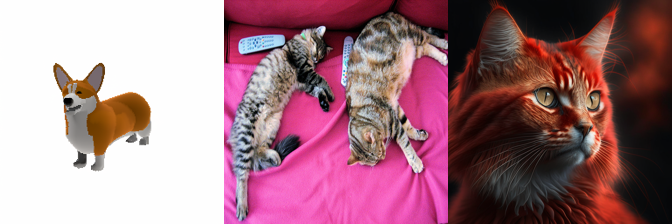
from PIL import Image# Two inputs, chosen to make the preprocessing point of section 8:# corgi - a studio-lit object on a clean plain background = what the models were trained on# cats - a real photograph: two cats on a cluttered sofa, off-centre, with a remote controlSAMPLES = {"corgi": ("https://hf.co/datasets/diffusers/docs-images/resolve/main/shap-e/corgi.png", DATA_DIR /"i23d_corgi.png"),"cats": ("http://images.cocodataset.org/val2017/000000039769.jpg", DATA_DIR /"i23d_cats.jpg"),"cat_clean": ("https://huggingface.co/datasets/hf-internal-testing/diffusers-images/resolve/main/kandinsky/cat.png", DATA_DIR /"i23d_cat_clean.png"),}images = {}for name, (url, path) in SAMPLES.items():ifnot path.exists(): urllib.request.urlretrieve(url, path) images[name] = Image.open(path).convert("RGB")print(f"{name:10s}{images[name].size}")def contact_sheet(imgs, cols=3, cell=192, bg=(240, 240, 240)):"Tile PIL images into a single contact-sheet image (used for multi-view grids)." rows = (len(imgs) + cols -1) // cols sheet = Image.new("RGB", (cols * cell, rows * cell), bg)for i, im inenumerate(imgs): sheet.paste(im.convert("RGB").resize((cell, cell)), ((i % cols) * cell, (i // cols) * cell))return sheetcontact_sheet(list(images.values()), cols=3, cell=224)
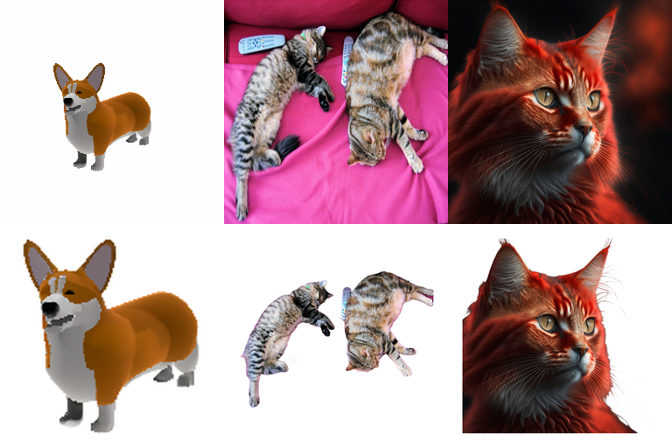
8. Preprocessing: isolate the object (the step everyone skips)
This is not a footnote - it decides whether the rest works. Every open single-image 3D model was trained on Objaverse renders: one object, centred, filling the frame, on a transparent or plain background, evenly lit. Hand it a photograph and it does what it was trained to do - reconstruct the whole scene into one blob, or lock onto the wrong object.
So the real pipeline is always: segment / matte -> crop to the object -> pad to a square -> composite on white -> generate. Production systems (Hunyuan3D, TRELLIS, InstantMesh) all ship a background remover in front of the model, usually SAM or a matting network.
Two transformers-native options:
briaai/RMBG-1.4 - a purpose-built salient-object matting model (IS-Net based). Its remote code predates transformers 5.x, so the image-segmentation pipeline no longer loads it (BriaRMBG.__init__ skips post_init()); the setup cell instead instantiates the class and loads the weights directly, then mattes an image to RGBA in one call. Tiny (~44M params), fast. Licence: CC-BY-NC-4.0 - non-commercial unless you buy a licence from BRIA (RMBG-2.0 is the newer, better sibling, same licence model). That matters if you ship this.
SAM / SAM 2 with a centre point or box prompt - see 12_Mask_Generation. More general (you choose which object), no matting-quality alpha at the hair/fur boundary.
The alpha matte quality at the silhouette is what you are buying: single-image 3D models read the silhouette as a hard geometric constraint, so a fringe of sofa left around the cat becomes a fringe of geometry on the mesh.
import torch, numpy as npimport torch.nn.functional as Ffrom transformers.dynamic_module_utils import get_class_from_dynamic_modulefrom huggingface_hub import hf_hub_downloadfrom safetensors.torch import load_file# RMBG-1.4's remote code predates transformers 5.x: BriaRMBG.__init__ never calls post_init(),# so the image-segmentation pipeline's from_pretrained crashes on the new `all_tied_weights_keys`# loader path. Instantiate the class and load the safetensors directly instead - same 44M IS-Net# matting model, no from_pretrained, no crash. RMBG stays fp32 (tiny; ~90 MB of VRAM).class RMBG:"briaai/RMBG-1.4 salient-object matting, loaded without the (broken on tf 5.x) HF pipeline."def__init__(self): BriaRMBG = get_class_from_dynamic_module("briarmbg.BriaRMBG", "briaai/RMBG-1.4")self.net = BriaRMBG().to(device).eval() sd = load_file(hf_hub_download("briaai/RMBG-1.4", "model.safetensors", cache_dir=HF_CACHE))self.net.load_state_dict(sd)@torch.no_grad()def__call__(self, img, size=(1024, 1024)):"Return `img` as RGBA with alpha = the matte (same output as the RMBG pipeline)." rgb = np.array(img.convert("RGB")); h, w = rgb.shape[:2] x = torch.tensor(rgb, dtype=torch.float32).permute(2, 0, 1).unsqueeze(0) x = (F.interpolate(x, size=size, mode="bilinear") /255.0-0.5).to(device) # RMBG norm: mean .5, std 1 m =self.net(x)[0][0] # highest-res sigmoid map, [1,1,1024,1024] m = F.interpolate(m, size=(h, w), mode="bilinear").squeeze() m = (m - m.min()) / (m.max() - m.min() +1e-8) out = img.convert("RGBA") out.putalpha(Image.fromarray((m *255).byte().cpu().numpy()))return outrmbg = RMBG()def isolate(img, size=256, bg=(255, 255, 255)):"Matte out the background, crop to the object's bbox, pad square, composite on `bg`." cut = rmbg(img) # RGBA: alpha = the matteif cut.mode !="RGBA": cut = cut.convert("RGBA") box = cut.getchannel("A").getbbox() # tight crop around non-transparent pixelsif box isnotNone: cut = cut.crop(box) side =int(max(cut.size) *1.15) # 15% margin: the models expect the object to breathe square = Image.new("RGBA", (side, side), (*bg, 255)) square.paste(cut, ((side - cut.width) //2, (side - cut.height) //2), cut)return square.convert("RGB").resize((size, size), Image.LANCZOS)t0 = time.perf_counter()clean = {name: isolate(img) for name, img in images.items()}print(f"matted {len(clean)} images in {time.perf_counter() - t0:.1f}s")del rmbgfree_memory()vram("after RMBG")# Top row: raw inputs. Bottom row: what the 3D model should actually be fed.contact_sheet( [img.resize((256, 256)) for img in images.values()] +list(clean.values()), cols=3, cell=224,)
matted 3 images in 0.6s
VRAM after RMBG            0.00 GB allocated /  0.00 GB reserved
9. Track A in miniature: depth -> point cloud
The cheapest possible “measured” 3D is a single depth map back-projected through a pinhole camera. It costs 30 ms, it needs no poses, and it is a fair illustration of the geometric route - but it also shows exactly why the geometric route needs more than one image.
Two honest limitations, both visible in the output below:
A monocular depth model gives you relative (often inverse) depth, not metric depth. The unprojection is therefore correct only up to an unknown scale and shift, so the point cloud’s proportions are wrong in a way you cannot fix from one image. Metric models (DepthPro, UniDepth) and multi-view methods (COLMAP, VGGT) are what fix this - see 00_Depth_Estimation.
You get a 2.5-D shell, not an object. There is nothing behind the visible surface. That is the entire gap that track B’s generative models exist to fill.
The intrinsics below are invented (a plausible focal length), which is the point: a real pipeline gets them from EXIF, calibration, or - since 2024 - regressed directly by DUSt3R/MASt3R/VGGT, which take unposed images and return cameras, depth and aligned point maps in one forward pass. VGGT is the model you would actually reach for here; it is not in transformers yet (vggt vendor repo only, CC-BY-NC weights with a separate VGGT-1B-Commercial checkpoint), so this cell uses the transformers-native depth model instead.
import numpy as npfrom transformers import pipeline as hf_pipelinedepth_pipe = hf_pipeline("depth-estimation", model="depth-anything/Depth-Anything-V2-Small-hf", # 25M params, Apache 2.0 device=device, model_kwargs={"cache_dir": HF_CACHE},)src = clean["corgi"] # the matted object from section 8t0 = time.perf_counter()pred = depth_pipe(src)print(f"depth in {time.perf_counter() - t0:.2f}s")d = pred["predicted_depth"].squeeze().float().cpu().numpy() # relative INVERSE depthd = np.array(Image.fromarray(d).resize(src.size, Image.BILINEAR))d = (d - d.min()) / (d.max() - d.min() +1e-8)# Back-project with invented intrinsics. z ~ 1/(inverse_depth) is monotonic but NOT metric.H, W = d.shapef =0.9* W # made-up focal lengthu, v = np.meshgrid(np.arange(W), np.arange(H))z =1.0/ (d *2.0+0.35) # avoid a divide-by-zero at the far planex = (u - W /2) * z / fy =-(v - H /2) * z / frgb = np.asarray(src, dtype=np.uint8)keep = d.reshape(-1) >0.06# drop the flat background planepts = np.stack([x, z, y], -1).reshape(-1, 3)[keep] # ECharts 3D is y-up-ish; reorder axescols = rgb.reshape(-1, 3)[keep]sel = np.random.default_rng(0).choice(len(pts), size=min(3000, len(pts)), replace=False)pts, cols = pts[sel], cols[sel] # subsample: ECharts serialises to JSONprint("point cloud:", pts.shape)del depth_pipe, predfree_memory()vram("after depth")
depth in 0.21s
point cloud: (3000, 3)
VRAM after depth           0.01 GB allocated /  0.02 GB reserved
from pyecharts import options as optsfrom pyecharts.charts import Scatter3D# Per-point colour via ECharts itemStyle. This is the legitimate use of a 3-D scatter:# it is a point cloud, not a decorated bar chart.data = [ {"value": [round(float(p[0]), 4), round(float(p[1]), 4), round(float(p[2]), 4)],"itemStyle": {"color": f"#{c[0]:02x}{c[1]:02x}{c[2]:02x}"}}for p, c inzip(pts, cols)]scatter = ( Scatter3D(init_opts=opts.InitOpts(width="820px", height="560px")) .add("depth back-projection", data, xaxis3d_opts=opts.Axis3DOpts(name="x", type_="value"), yaxis3d_opts=opts.Axis3DOpts(name="z (depth)", type_="value"), zaxis3d_opts=opts.Axis3DOpts(name="y", type_="value"), ) .set_global_opts( title_opts=opts.TitleOpts( title="Single-image point cloud (Depth Anything V2)", subtitle="A 2.5-D shell: relative depth, invented intrinsics, nothing behind the surface", ) ))# pyecharts 2.1 dropped the `symbol_size` kwarg; symbolSize is a series option.scatter.options["series"][0]["symbolSize"] =3scatter.render_notebook()
10. Novel-view diffusion: Zero123++
The idea that unlocked single-image 3D. Zero-1-to-3 (ICCV 2023) fine-tuned Stable Diffusion on Objaverse renders with the relative camera transform as an extra condition. The model no longer answers “what image matches this text” but “what does this object look like from 40 degrees up and 90 degrees around”. You then lift the generated views to 3D with any reconstructor. The image prior does the hallucinating, and the geometry stays somebody else’s problem.
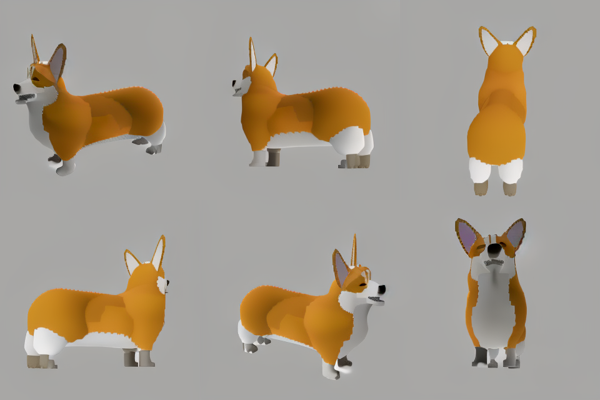
Its flaw is multi-view inconsistency: each view is a separate sample from a distribution, so the corgi’s ear is in a different place in each one and the reconstruction averages them into mush. Zero123++ (sudo-ai/zero123plus-v1.2) fixes this the blunt way: it generates all six views as one tiled 960x640 image (elevations +20 and -10 degrees; azimuths 30, 90, 150, 210, 270, 330), so a single denoising pass with global self-attention sees every view at once and has to keep them consistent. It is the front half of InstantMesh and of many production pipelines.
It ships a hub-hosted custom_pipeline, so it is loadable through plain diffusers (~5 GB VRAM). Note the output is images, not geometry - lifting them to a mesh needs a reconstructor (InstantMesh’s LRM), which is vendor code. Weights are CC-BY-NC-4.0.
The original Zero-1-to-3 is also reachable from diffusers as a community pipeline - DiffusionPipeline.from_pretrained("kxic/zero123-165000", custom_pipeline="pipeline_zero1to3"), which takes explicit poses=[polar, azimuth, radius] per view and needs kornia installed. Use it if you want to see the inconsistency for yourself; Zero123++ is what you would actually deploy.
from diffusers import DiffusionPipeline, EulerAncestralDiscreteSchedulermv = DiffusionPipeline.from_pretrained("sudo-ai/zero123plus-v1.2", custom_pipeline="sudo-ai/zero123plus-pipeline", # hosted alongside the weights trust_remote_code=True, # required by diffusers to run the hub-hosted pipeline.py torch_dtype=dtype, cache_dir=HF_CACHE,)mv.scheduler = EulerAncestralDiscreteScheduler.from_config( mv.scheduler.config, timestep_spacing="trailing")mv = mv.to(device)t0 = time.perf_counter()grid = mv(clean["corgi"], num_inference_steps=28).images[0] # 28 steps is enough for plain objectsprint(f"6 views in {time.perf_counter() - t0:.1f}s -> {grid.size} (a 3x2 tile of 320x320 views)")# Split the tile back into the six views and show them as a contact sheet.def split_grid(g, rows=3, cols=2): w, h = g.width // cols, g.height // rowsreturn [g.crop((c * w, r * h, (c +1) * w, (r +1) * h)) for r inrange(rows) for c inrange(cols)]views = split_grid(grid)del mv, gridfree_memory()vram("after zero123++")contact_sheet(views, cols=3, cell=200)
6 views in 11.1s -> (640, 960) (a 3x2 tile of 320x320 views)
VRAM after zero123++       0.01 GB allocated /  0.02 GB reserved
11. Shap-E img2img: one image in, a mesh out
The only diffusers-native image-to-3D pipeline. Shap-E (OpenAI, 2023) diffuses in the space of implicit-function parameters: the latent it samples IS the weight vector of a small MLP, which can be evaluated as a NeRF (render a turntable) or marching-cubed into a textured mesh. openai/shap-e-img2img conditions that on a CLIP image embedding instead of text.
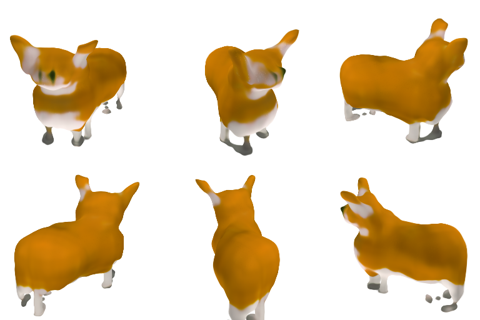
Set expectations honestly. This is a 2023 model, ~0.3B params, and it shows: blobby geometry, muddy vertex colours, no PBR, no UVs, and it is conditioned only on a global CLIP embedding - so it captures the category of your input far better than the instance. TripoSR, TRELLIS.2 and Hunyuan3D are enormously better. Shap-E is here because it is the only one that runs from pip install diffusers with no vendor repo, it is fast (seconds), and it demonstrates the whole shape - image in, mesh out, exported to disk - end to end.
Two calls: output_type defaults to "pil" (a list of rendered turntable frames -> GIF) and output_type="mesh" gives a MeshDecoderOutput that export_to_ply writes to disk.
from diffusers import ShapEImg2ImgPipelinefrom diffusers.utils import export_to_giffrom IPython.display import Image as IPyImageshap_e = ShapEImg2ImgPipeline.from_pretrained("openai/shap-e-img2img", torch_dtype=dtype, cache_dir=HF_CACHE,).to(device)t0 = time.perf_counter()frames = shap_e( clean["corgi"], # the MATTED image from section 8, not the raw photo guidance_scale=3.0, num_inference_steps=64, frame_size=256,).images[0] # a list of PIL frames orbiting the objectprint(f"turntable ({len(frames)} frames) in {time.perf_counter() - t0:.1f}s")gif_path = export_to_gif(frames, str(OUT_DIR /"corgi_turntable.gif"))display(IPyImage(filename=gif_path))contact_sheet(frames[::max(1, len(frames) //6)][:6], cols=3, cell=160)
The config attributes {'renderer': ['shap_e', 'ShapERenderer']} were passed to ShapEImg2ImgPipeline, but are not expected and will be ignored. Please verify your model_index.json configuration file.
Keyword arguments {'renderer': ['shap_e', 'ShapERenderer']} are not expected by ShapEImg2ImgPipeline and will be ignored.
An error occurred while trying to fetch /home/bthek1/Knowledge/DL/DL_tasks/datasets/hf_cache/models--openai--shap-e-img2img/snapshots/0e0aba80f08d368aaf6af9cb93583707481cc29b/prior: Error no file named diffusion_pytorch_model.safetensors found in directory /home/bthek1/Knowledge/DL/DL_tasks/datasets/hf_cache/models--openai--shap-e-img2img/snapshots/0e0aba80f08d368aaf6af9cb93583707481cc29b/prior.
Defaulting to unsafe serialization. Pass `allow_pickle=False` to raise an error instead.
An error occurred while trying to fetch /home/bthek1/Knowledge/DL/DL_tasks/datasets/hf_cache/models--openai--shap-e-img2img/snapshots/0e0aba80f08d368aaf6af9cb93583707481cc29b/shap_e_renderer: Error no file named diffusion_pytorch_model.safetensors found in directory /home/bthek1/Knowledge/DL/DL_tasks/datasets/hf_cache/models--openai--shap-e-img2img/snapshots/0e0aba80f08d368aaf6af9cb93583707481cc29b/shap_e_renderer.
Defaulting to unsafe serialization. Pass `allow_pickle=False` to raise an error instead.
turntable (20 frames) in 36.1s
<IPython.core.display.Image object>
from diffusers.utils import export_to_ply# Same pipeline, mesh output. The mesh comes out of a marching-cubes pass over the# implicit function, so vertex count is a function of the grid, not of the object.t0 = time.perf_counter()mesh = shap_e( clean["corgi"], guidance_scale=3.0, num_inference_steps=64, frame_size=256, output_type="mesh",).images[0]print(f"mesh in {time.perf_counter() - t0:.1f}s")ply_path = export_to_ply(mesh, str(OUT_DIR /"corgi.ply"))print("wrote", ply_path)verts = mesh.verts.detach().cpu().numpy()faces = mesh.faces.detach().cpu().numpy()print(f"vertices={len(verts)} faces={len(faces)}")del shap_efree_memory()vram("after shap-e")# Mesh hygiene: the properties a downstream artist actually cares about, none of which# appear on any leaderboard. trimesh is optional - guard it.def inspect_mesh(ply_file):"Report vertex/face counts, watertightness, manifoldness and volume; export a .glb."try:import trimeshexceptImportError:print("trimesh not installed - skipping mesh inspection (pip install trimesh)")returnNoneimport numpy as np m = trimesh.load(str(ply_file), force="mesh") rot = trimesh.transformations.rotation_matrix(-np.pi /2, [1, 0, 0]) # shap-e exports bottom-up m.apply_transform(rot) glb =str(Path(ply_file).with_suffix(".glb")) m.export(glb, file_type="glb") info = {"vertices": len(m.vertices),"faces": len(m.faces),"watertight": bool(m.is_watertight),"winding_consistent": bool(m.is_winding_consistent),"euler_number": int(m.euler_number),"volume": float(m.volume) if m.is_watertight elsefloat("nan"),"has_uvs": m.visual.uv isnotNoneifhasattr(m.visual, "uv") elseFalse,"glb": glb, }for k, v in info.items():print(f" {k:20s}{v}")return mmesh_obj = inspect_mesh(ply_path)
mesh in 11.5s
wrote ../../datasets/image_to_3d/corgi.ply
vertices=112906  faces=225828
VRAM after shap-e          0.02 GB allocated /  0.07 GB reserved
trimesh not installed - skipping mesh inspection (pip install trimesh)
# The generated mesh as a point cloud, in ECharts. Watch the BACK of the object as you# rotate it: that half was never observed, and no metric in section 4 can tell you# whether it is right.import numpy as npv = verts if mesh_obj isNoneelse np.asarray(mesh_obj.vertices)sel = np.random.default_rng(1).choice(len(v), size=min(4000, len(v)), replace=False)vs = v[sel]mesh_scatter = ( Scatter3D(init_opts=opts.InitOpts(width="820px", height="560px")) .add("shap-e mesh vertices", [[round(float(a), 4), round(float(b), 4), round(float(c), 4)] for a, b, c in vs], xaxis3d_opts=opts.Axis3DOpts(name="x", type_="value"), yaxis3d_opts=opts.Axis3DOpts(name="y", type_="value"), zaxis3d_opts=opts.Axis3DOpts(name="z", type_="value"), ) .set_global_opts( title_opts=opts.TitleOpts( title=f"Shap-E mesh vertices ({len(v)} total, {len(vs)} shown)", subtitle="A closed surface - but half of it is invented", ), visualmap_opts=opts.VisualMapOpts( is_show=True, dimension=1, min_=float(vs[:, 1].min()), max_=float(vs[:, 1].max()), range_color=["#4a90d9", "#7ec4a0", "#f0c419", "#e8734a"], ), ))# pyecharts 2.1 dropped the `symbol_size` kwarg; symbolSize is a series option.mesh_scatter.options["series"][0]["symbolSize"] =2mesh_scatter.render_notebook()
12. Head-to-head Benchmark
What this can and cannot be. It cannot be a leaderboard: the models that would top one (TRELLIS.2, Hunyuan3D, TripoSG) all need vendor repos and more than 12 GB, so they are not here. What it can honestly measure is the two things that actually vary in a 12 GB deployment:
Does the background-removal step in section 8 matter? (The claim: enormously.)
What does each runnable model cost per asset, and what do you get?
Metric: CLIP similarity between the input image and renders of the output - the metric you are stuck with when you have no ground-truth mesh (section 4). It is a semantic score, not a geometric one: it rewards “this looks like a corgi from every angle” and is blind to whether the mesh is watertight, so it is reported next to the mesh-hygiene columns rather than instead of them.
Hardware: RTX 3060 12 GB, 4 vCPU. Sample size: 3 images. This is a smoke test. For a real number, run Google Scanned Objects and report F-score@0.05; for a ranking humans agree with, look at 3D Arena.
from transformers import CLIPModel, CLIPProcessorclip_id ="openai/clip-vit-base-patch32"clip_proc = CLIPProcessor.from_pretrained(clip_id, cache_dir=HF_CACHE)clip_model = CLIPModel.from_pretrained(clip_id, cache_dir=HF_CACHE).to(device).eval()@torch.inference_mode()def clip_embed(imgs):"L2-normalised CLIP image embeddings for a list of PIL images." inputs = clip_proc(images=imgs, return_tensors="pt").to(device) e = clip_model.get_image_features(**inputs).pooler_outputreturn torch.nn.functional.normalize(e, dim=-1)def clip_similarity(input_img, rendered_views):"Mean cosine similarity between the input image and each rendered view." a = clip_embed([input_img]) b = clip_embed(list(rendered_views))returnfloat((a @ b.T).mean().item())# Sanity check: identical images -> 1.0; the raw cluttered photo vs its matted version -> < 1.print("self :", round(clip_similarity(images["corgi"], [images["corgi"]]), 3))print("raw vs matted (cats):", round(clip_similarity(images["cats"], [clean["cats"]]), 3))
self  : 1.0
raw vs matted (cats): 0.826
import pandas as pdBENCH = ["corgi", "cats", "cat_clean"]results = []# --- Model 1: Shap-E, two configurations (raw photo vs matted object) -------------shap_e = ShapEImg2ImgPipeline.from_pretrained("openai/shap-e-img2img", torch_dtype=dtype, cache_dir=HF_CACHE,).to(device)for cfg, source in [("shap-e (raw input)", images), ("shap-e (background removed)", clean)]:for name in BENCH: img = source[name].resize((256, 256)) t0 = time.perf_counter() frames = shap_e(img, guidance_scale=3.0, num_inference_steps=48, frame_size=128).images[0] secs = time.perf_counter() - t0 m = shap_e(img, guidance_scale=3.0, num_inference_steps=48, frame_size=128, output_type="mesh").images[0] results.append({"model": cfg,"image": name,"seconds": round(secs, 1),"clip_sim": round(clip_similarity(clean[name], frames[::8]), 3), # always score vs the clean object"vertices": len(m.verts),"faces": len(m.faces), })print(results[-1])del shap_efree_memory()vram("after shap-e bench")
The config attributes {'renderer': ['shap_e', 'ShapERenderer']} were passed to ShapEImg2ImgPipeline, but are not expected and will be ignored. Please verify your model_index.json configuration file.
Keyword arguments {'renderer': ['shap_e', 'ShapERenderer']} are not expected by ShapEImg2ImgPipeline and will be ignored.
An error occurred while trying to fetch /home/bthek1/Knowledge/DL/DL_tasks/datasets/hf_cache/models--openai--shap-e-img2img/snapshots/0e0aba80f08d368aaf6af9cb93583707481cc29b/prior: Error no file named diffusion_pytorch_model.safetensors found in directory /home/bthek1/Knowledge/DL/DL_tasks/datasets/hf_cache/models--openai--shap-e-img2img/snapshots/0e0aba80f08d368aaf6af9cb93583707481cc29b/prior.
Defaulting to unsafe serialization. Pass `allow_pickle=False` to raise an error instead.
An error occurred while trying to fetch /home/bthek1/Knowledge/DL/DL_tasks/datasets/hf_cache/models--openai--shap-e-img2img/snapshots/0e0aba80f08d368aaf6af9cb93583707481cc29b/shap_e_renderer: Error no file named diffusion_pytorch_model.safetensors found in directory /home/bthek1/Knowledge/DL/DL_tasks/datasets/hf_cache/models--openai--shap-e-img2img/snapshots/0e0aba80f08d368aaf6af9cb93583707481cc29b/shap_e_renderer.
Defaulting to unsafe serialization. Pass `allow_pickle=False` to raise an error instead.
from pyecharts.charts import Bar, Page, Scattermodels = summary["model"].tolist()bar = ( Bar() .add_xaxis(models) .add_yaxis("mean CLIP similarity (input vs renders)", [round(float(x), 3) for x in summary["clip_sim"]]) .set_global_opts( title_opts=opts.TitleOpts( title="Image-to-3D: CLIP similarity", subtitle="RTX 3060, 3 images. A semantic score - it says nothing about mesh quality.", ), xaxis_opts=opts.AxisOpts(axislabel_opts=opts.LabelOpts(rotate=15)), yaxis_opts=opts.AxisOpts(name="cosine similarity", min_=0.5), tooltip_opts=opts.TooltipOpts(trigger="axis"), ))scatter = ( Scatter() .add_xaxis([round(float(x), 1) for x in summary["seconds"]]) .set_global_opts( title_opts=opts.TitleOpts(title="Quality vs time", subtitle="up and to the left is better"), xaxis_opts=opts.AxisOpts(name="seconds / asset", type_="value"), yaxis_opts=opts.AxisOpts(name="CLIP similarity", type_="value", min_=0.5), tooltip_opts=opts.TooltipOpts(formatter="{a}: {c}"), ))for m, s, c inzip(models, summary["seconds"], summary["clip_sim"]): scatter.add_yaxis(m, [[round(float(s), 1), round(float(c), 3)]], symbol_size=18, label_opts=opts.LabelOpts(is_show=False))page = Page(layout=Page.SimplePageLayout)page.add(bar, scatter)page.render_notebook()
13. Try it on your own image
Drop any photo into DL_tasks/datasets/ and point MY_IMAGE at it. The cell runs the full honest pipeline - matte, crop, generate, export - and is guarded so it skips cleanly when the file is not there.
The interesting experiment is to run it twice: once on the raw photo and once on the matted object, and see which failure you get. Then look at the back of the mesh and ask yourself how you would ever know if it were wrong.
MY_IMAGE = DATA_DIR /"svd_rocket.png"# <- put your own image heretry:ifnot MY_IMAGE.exists():raiseFileNotFoundError(f"{MY_IMAGE} not found - drop an image there to run this cell") user_img = Image.open(MY_IMAGE).convert("RGB") rmbg = RMBG() matted = isolate(user_img)del rmbg free_memory() shap_e = ShapEImg2ImgPipeline.from_pretrained("openai/shap-e-img2img", torch_dtype=dtype, cache_dir=HF_CACHE, ).to(device) frames = shap_e(matted, guidance_scale=3.0, num_inference_steps=64, frame_size=256).images[0] my_mesh = shap_e(matted, guidance_scale=3.0, num_inference_steps=64, frame_size=256, output_type="mesh").images[0]del shap_e free_memory() my_ply = export_to_ply(my_mesh, str(OUT_DIR /"my_object.ply")) display(IPyImage(filename=export_to_gif(frames, str(OUT_DIR /"my_object.gif")))) inspect_mesh(my_ply)exceptFileNotFoundErroras e:print("skipping:", e)finally: free_memory() vram("final")
The config attributes {'renderer': ['shap_e', 'ShapERenderer']} were passed to ShapEImg2ImgPipeline, but are not expected and will be ignored. Please verify your model_index.json configuration file.
Keyword arguments {'renderer': ['shap_e', 'ShapERenderer']} are not expected by ShapEImg2ImgPipeline and will be ignored.
An error occurred while trying to fetch /home/bthek1/Knowledge/DL/DL_tasks/datasets/hf_cache/models--openai--shap-e-img2img/snapshots/0e0aba80f08d368aaf6af9cb93583707481cc29b/prior: Error no file named diffusion_pytorch_model.safetensors found in directory /home/bthek1/Knowledge/DL/DL_tasks/datasets/hf_cache/models--openai--shap-e-img2img/snapshots/0e0aba80f08d368aaf6af9cb93583707481cc29b/prior.
Defaulting to unsafe serialization. Pass `allow_pickle=False` to raise an error instead.
An error occurred while trying to fetch /home/bthek1/Knowledge/DL/DL_tasks/datasets/hf_cache/models--openai--shap-e-img2img/snapshots/0e0aba80f08d368aaf6af9cb93583707481cc29b/shap_e_renderer: Error no file named diffusion_pytorch_model.safetensors found in directory /home/bthek1/Knowledge/DL/DL_tasks/datasets/hf_cache/models--openai--shap-e-img2img/snapshots/0e0aba80f08d368aaf6af9cb93583707481cc29b/shap_e_renderer.
Defaulting to unsafe serialization. Pass `allow_pickle=False` to raise an error instead.
<IPython.core.display.Image object>
trimesh not installed - skipping mesh inspection (pip install trimesh)
VRAM final                 0.02 GB allocated /  0.07 GB reserved
14. Common Frameworks
Image-to-3D has two ecosystems that barely overlap. The feed-forward route - one image in, a mesh out - is vendor repos and a couple of diffusers pipelines. The multi-view route - photograph an object from many angles and reconstruct it - is a mature computer-vision stack (COLMAP, nerfstudio, gsplat) that predates generative models entirely and still produces better geometry whenever you can take more than one photograph. Choosing the wrong route is the expensive mistake here.
Geometric error against a reference mesh when you have one, and prompt/image agreement when you do not
MIT / BSD-3
Comparing methods. Chamfer needs alignment and scale normalisation first, which is where most reported numbers go wrong
The 2026 default stack is: if you can take more than one photograph, COLMAP plus gsplat. If you cannot, background-removal into TripoSR or TRELLIS, then trimesh and Blender for the post-process. diffusers covers the parts that are library-native, which is a smaller share of this task than of any other in this folder.
The common wrong turn is reaching for a generative model when the problem is a reconstruction problem. Single-image 3D is hallucinating the back of the object; multi-view reconstruction is measuring it. The second is skipping the preprocessing - a cluttered background or an off-centre subject degrades every model here more than the choice between them.
15. Going Further
Everything runnable above is a 2023-generation model, because that is what is HF-library-native. Reaching the actual state of the art means cloning a repo into a separate environment; the frameworks table above names which repo for which job, with the VRAM and licence traps attached. The transformers PR for VGGT is still open as of mid-2026, which is a fair summary of how library-native this task is.
Fine-tuning. Most single-image models are fine-tuned on Objaverse renders; the standard recipe is to render your own asset library from fixed camera orbits and fine-tune the multi-view diffusion stage (LoRA on Zero123++ works and is cheap). Fine-tuning the shape decoder usually is not worth it unless your domain geometry is far from Objaverse (e.g. CAD, medical).
Mesh post-processing is half the job. Remeshing/decimation (Instant Meshes, quadric decimation via trimesh), UV unwrapping (xatlas), texture baking, and delighting. The gap between “a mesh a benchmark likes” and “a mesh an artist accepts” is almost entirely here.
Related notebooks.14_Text_to_3D (3D representations primer, SDS vs feed-forward, the text-conditioned half of the same models), 00_Depth_Estimation (the 2.5-D route and metric depth), 17_Keypoint_Detection (SfM runs on these matches), 12_Mask_Generation (SAM as the alternative to RMBG), 07_Image_to_Video (orbit videos as a poor man’s turntable).