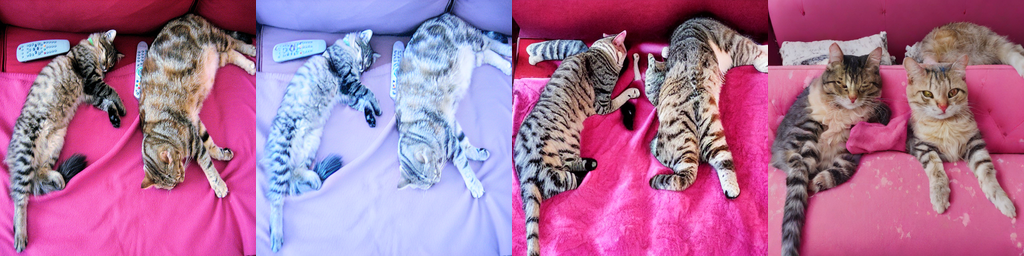
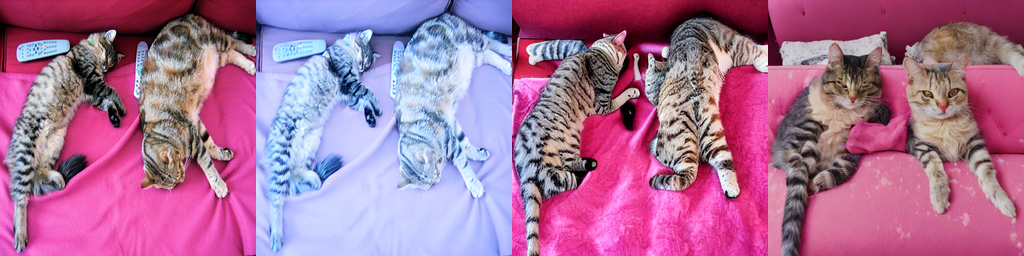
Everything to know about image-to-image: the sub-tasks it hides (img2img, inpainting, instruction editing, ControlNet, super-resolution), how conditioning actually works, the mid-2026 model landscape, why there is no single metric, and runnable code to test the leading open models on a 12 GB card.
Author
Benedict Thekkel
1. What is Image-to-Image?
Image-to-image is not one task. It is the Hugging Face pipeline tag for any model whose input contains an image and whose output is an image, and the members of that family share an interface, not a mechanism. A super-resolution CNN and an instruction-following 20B diffusion transformer both “do image-to-image” and have nothing else in common. Treat this notebook as an umbrella: pick the sub-task first, then the model.
Input. A source image (PIL.Image, RGB), plus whatever the sub-task conditions on: a text prompt, an edit instruction, a binary mask, a structural map (edges/depth/pose), a reference image, or nothing at all.
Output. A new image, usually at the same resolution as the source (super-resolution being the obvious exception).
The sub-tasks under the umbrella:
Sub-task
Extra conditioning
What it changes
Typical model
img2img / style transfer
text prompt + strength
global appearance, loosely anchored to the source layout
That last row is the one people forget: depth estimation is technically image-to-image (Depth Anything’s HF pipeline tag literally is image-to-image on some cards), and dense-map predictors are exactly what supplies ControlNet’s conditioning. The tasks feed each other.
Neighbouring notebooks:04_Text_to_Image (the base generative model everything here conditions), 05_Image_to_Text (the inverse), 12_Mask_Generation (SAM produces the masks you inpaint with), 16_Image_Feature_Extraction (CLIP/DINO embeddings, which is how we score edits in section 4), 18_Video_to_Video (the same conditioning problem, plus temporal consistency).
No invented detail on faces and text; throughput per image; deterministic output
Virtual try-on and staging
Fashion, real estate (IDM-VTON-style pipelines, Zillow-style staging)
Person photo + garment reference -> composited render
Identity and garment fidelity; masking accuracy; latency in an interactive loop
Medical image translation
Healthcare research (MRI->CT synthesis, stain normalisation)
Modality A -> modality B
Structural faithfulness above all - a generative model that invents a lesion is a catastrophe; hence CycleGAN/UNet still beat diffusion here in practice
Satellite / aerial enhancement
Defence, agriculture, mapping
Cloudy or low-res tile -> cleaned tile
Geometric accuracy; auditability; no fabricated features
Content moderation and de-identification
Platforms, dashcam / streetview
Frame + face/plate detections -> blurred or synthesised replacement
Recall of the mask (a missed face is a breach); batch cost
What the benchmark number hides. Editing leaderboards score one instruction on one image and average. Production does none of that. The failure that kills a product is almost never “the edit was mediocre” - it is collateral damage: you asked for a new background and the model quietly redrew the face, shifted the logo, changed the shade of the brand colour, or subtly deformed the hands. Diffusion editors round-trip the whole image through a VAE, so even the unedited pixels come back re-encoded and slightly different; if your pipeline must guarantee the untouched region is bit-identical, you have to composite the source back in outside the mask yourself. Then there is cost: a 20B editor is 40 GB of weights and seconds per image, so the shipped system is usually a small distilled model with a big one behind a “make it better” button. And domain shift is brutal: models trained on synthetic edit triplets of web photos degrade sharply on documents, screenshots, X-rays, and CAD renders - exactly the images enterprises want edited.
3. How Modern Image-to-Image Works
This notebook assumes the diffusion fundamentals from 04_Text_to_Image (latent diffusion, the U-Net/DiT denoiser, the VAE, classifier-free guidance, samplers). What follows is only the conditioning story: how you get a source image into a model that was trained to denoise from noise.
Timeline:
Paired supervised CNNs (2016-2020). pix2pix (conditional GAN, needs aligned pairs), CycleGAN (unpaired, cycle-consistency loss), SRCNN/ESRGAN for super-resolution. Still the right answer when you have aligned pairs and need a deterministic, structure-preserving map (medical modality translation, stain normalisation).
SDEdit / img2img (2021-2022). The trick that started everything: do not start from pure noise - start from the source. Encode the image to a latent, add noise up to an intermediate timestep, and denoise from there with a text prompt. Zero training required. It works because a partially noised image still carries the low-frequency layout while the high-frequency identity has been destroyed.
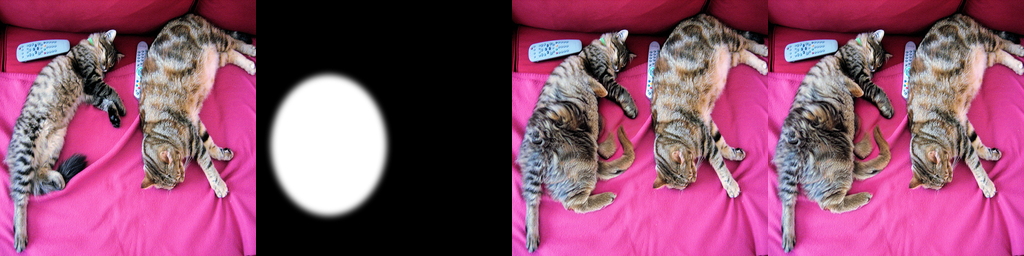
Inpainting checkpoints (2022). Retrain the U-Net with 9 input channels (4 noisy latent + 1 downsampled mask + 4 masked-image latent) on random masks, so the model sees the hole and the context instead of being blended into it.
ControlNet / T2I-Adapter (Feb 2023). Add a structural conditioning stream (edges, depth, pose, scribble) without touching the base model. This is what made diffusion usable by professionals.
InstructPix2Pix (Jan 2023). Reformulate editing as instruction following. Generate ~450k synthetic (source, instruction, target) triplets with GPT-3 + Prompt2Prompt, then fine-tune SD with the source latent concatenated to the input. No mask, no per-image prompt engineering.
IP-Adapter (Aug 2023). ~22M params of decoupled cross-attention that inject a CLIP image embedding as an “image prompt” - subject and style transfer with no fine-tuning.
Unified DiT editors (2024-2026). The current line. FLUX.1 Kontext (12B, Jun 2025), Step1X-Edit (~19B, Apr 2025, which introduced GEdit-Bench), Qwen-Image-Edit / -2509 / -2511 (20B MMDiT, Dec 2025), FLUX.2 [dev] (32B + a Mistral-3 24B VLM, Nov 2025), and the closed frontier: Gemini 2.5 Flash Image (“nano-banana”), Nano Banana Pro / Gemini 3 Pro Image (Nov 2025), GPT-Image-1. These treat the source image as extra tokens in the transformer sequence rather than a channel-concat, which is why they can take several reference images and follow multi-step instructions.
The strength parameter (the most misunderstood knob in img2img)
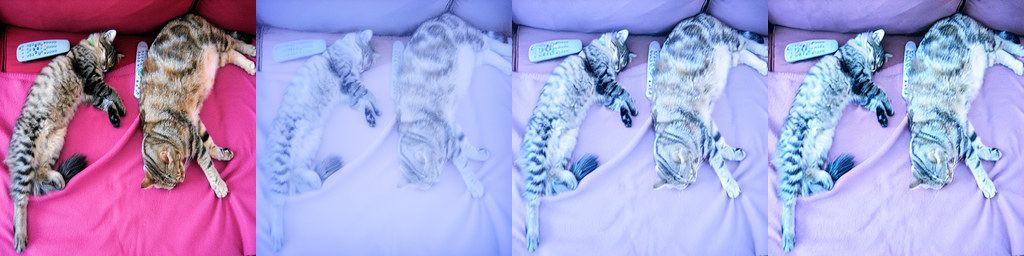
img2img does not run all your denoising steps. It runs
of them, skipping the earlier (noisier) ones entirely. The source latent is noised to exactly that timestep and denoising resumes from there. So strength simultaneously controls:
how much of the source survives - at 0.0 you get the source back untouched, at 1.0 the source is fully destroyed and you are doing plain text-to-image;
how long the call takes - strength=0.3 with 50 steps runs 15 steps, not 50.
Practical bands: 0.2-0.35 = colour/lighting grade, 0.4-0.6 = restyle with the composition intact (the useful zone), 0.7-0.9 = “inspired by”, 1.0 = new image. With SDXL-Turbo (1-4 steps total) you must keep num_inference_steps * strength >= 1 or the pipeline runs zero steps and hands you back the input.
Why naive inpainting seams
The tempting approach - run img2img, then paste the generated pixels into the hole - fails for three compounding reasons: the model never saw the mask, so it had no reason to make the fill agree with the context; the VAE is 8x downsampling, so a pixel-space mask edge lands between latent cells and bleeds; and the region outside the mask has been re-encoded, so it no longer matches the original even where you did not ask for a change. The fixes, in increasing order of quality:
Latent blending. At every denoising step, overwrite the outside-mask latents with the correctly noised source latents for that timestep. This is what StableDiffusionInpaintPipeline does when handed an ordinary (non-inpaint) checkpoint. Cheap, and it keeps the context stable, but the model is still guessing about the hole.
Inpainting checkpoints (stable-diffusion-v1-5/stable-diffusion-inpainting, FLUX Fill). The 9-channel U-Net above. Trained on random masks, so filling a hole is the training objective, not an inference hack. Much better boundary agreement.
Feather the mask, and inpaint at full resolution in a crop.padding_mask_crop=32 in diffusers crops to the masked region, inpaints at native resolution, and composites back - which fixes the “my 4K photo got downsampled to 512 and the fill is mush” problem.
Composite back in pixel space. After the fact, Image.composite(generated, source, mask) so the untouched region is byte-identical to the original. Do this whenever the source is a real photograph you must not alter.
ControlNet and the zero-convolution
ControlNet does not fine-tune the base model at all. It clones the encoder (the U-Net’s down-blocks + mid-block), leaves the original frozen, and wires the clone’s outputs into the frozen decoder’s skip connections through 1x1 convolutions whose weights and biases are initialised to exactly zero.
At training step zero every zero-conv outputs 0, so \(\mathbf{y}_c = \mathcal{F}(\mathbf{x};\Theta)\): the network is bit-identical to the base model, and no random noise is injected into a 900M-parameter pretrained model by an untrained adapter. The gradient with respect to the zero-conv weights is still non-zero (it is proportional to the incoming activations, which are not zero), so the layer learns to open up gradually. That is the whole trick, and it is why ControlNet trains to convergence on ~50k pairs on a single GPU without catastrophic forgetting, and why any SD 1.5 checkpoint can pick up any SD 1.5 ControlNet at inference time. T2I-Adapter does the same job with a much smaller (77M) feed-forward adapter that is added once rather than per-block: cheaper and faster, slightly weaker adherence.
How instruction editors differ
An instruction editor takes the source image as an extra conditioning stream and is trained on edit triplets (source, instruction, target), so it learns “change only what was asked” as an objective rather than inheriting it from a hack.
InstructPix2Pix concatenates the VAE latent of the source to the noisy latent (8 input channels; the new weights are zero-initialised) and uses two guidance scales: guidance_scale for text adherence and image_guidance_scale for source fidelity. If your edit is being ignored, raise text guidance / lower image_guidance_scale; if the image is being destroyed, do the reverse. That two-knob search is the fidelity/adherence trade-off made explicit.
Kontext / Qwen-Image-Edit / FLUX.2 tokenise the source (VAE tokens, plus VLM tokens in Qwen-Image-Edit’s dual-encoding and FLUX.2’s Mistral-3 encoder) and append them to the DiT’s token sequence - in-context conditioning. That is why they handle multiple reference images, text rendering inside the image, and chained instructions, and why they are 12-32B parameters.
Cheat sheet:
Approach
Training needed
Preserves source
Control
Cost
img2img (SDEdit)
none
via strength, loosely
prompt only
cheapest
Inpainting checkpoint
pretrained
exactly, outside mask
mask + prompt
cheap
ControlNet
+0.36B adapter (once)
structure only, not appearance
edges/depth/pose
+~45% per step
T2I-Adapter
+77M adapter (once)
structure only
same, weaker
+~5%
IP-Adapter
+22M adapter (once)
subject/style from a reference
image prompt
negligible
InstructPix2Pix
full fine-tune on triplets
decent, tunable
free-text instruction
cheap (SD 1.5 sized)
DiT editor (Kontext/Qwen)
full pretrain, 12-32B
best
free-text, multi-image
does not fit a 12 GB card unquantised
4. Evaluation Metrics
There is no single metric for image-to-image, and anyone who quotes you one number is measuring the wrong thing. The metric depends entirely on which sub-task you are in, and for editing you need at least two numbers that pull against each other.
Reference-based (restoration, super-resolution: a ground-truth target exists)
PSNR - peak signal-to-noise ratio, in dB, over the pixel MSE:
with \(C_1 = (0.01L)^2\), \(C_2 = (0.03L)^2\) and \(L\) the dynamic range.
The pitfall that defines the field: PSNR and SSIM reward blur. Both are minimised by predicting the conditional mean of the plausible outputs, and the mean of many sharp textures is a smooth one. A model that hedges beats a model that commits, so a GAN or diffusion upscaler that produces genuinely convincing texture will often score worse on PSNR than a boring L2-trained CNN that a human would reject instantly. This is the perception-distortion trade-off, and it is a proven bound, not a tuning failure.
LPIPS - the standard fix. Feed both images through a pretrained network (AlexNet/VGG), compare normalised deep activations per layer, learn the channel weights against human 2AFC judgements. Lower is better; it correlates with human preference far better than PSNR. DISTS goes further by mixing structure and texture statistics, so it stops punishing a resynthesised-but-perceptually-identical texture.
Distribution-based (no per-image reference)
FID compares Inception feature distributions between two image sets as a Frechet distance; KID is the unbiased kernel version and is the honest choice below ~10k images, where FID’s bias is large. Both measure realism of a set, never of one image.
Editing (the hard case: there is no ground truth, and two things must be true at once)
CLIP directional similarity asks whether the edit moved the image in the direction the instruction asked. Take a caption of the source \(c_{src}\) and of the intended result \(c_{tgt}\):
It is direction-aware, which plain CLIP score is not: a model that ignores the source entirely and generates a fresh picture of the target caption gets a high CLIP score and a poor directional score.
Source preservation is the counterweight: CLIP or DINO image-image cosine similarity between source and edit (DINOv2/DINOv3 embeddings are the better choice for subject identity because they are self-supervised on visual structure rather than on captions), or a masked L1/LPIPS over the region that should not have changed.
The fundamental tension. These two metrics are trivially gameable in opposite directions:
return the input unchanged -> perfect preservation, zero adherence;
ignore the input and generate the target caption from scratch -> high adherence, zero preservation.
So neither number means anything alone. Report both, and plot them against each other - the 2-D scatter in section 14 is not decoration, it is the only honest summary of an editing model. In 2026 the serious benchmarks all encode this: MagicBrush (10k human-annotated triplets, multi-turn), the Emu Edit test set, GEdit-Bench (from Step1X-Edit; real user instructions, VLM-judged on instruction-following + consistency + quality, now GEditBench v2 with 23 tasks and an open PVC-Judge), and ImgEdit-Bench (NeurIPS 2025 D&B; scores instruction adherence, editing quality, and detail preservation separately). The judge is increasingly a VLM (GPT-5-class or the open PVC-Judge), because no closed-form metric captures “did it change only what I asked”.
Speed
Per-image latency at a fixed resolution and step count, and the step count itself - a 4-step SDXL-Turbo edit and a 50-step SD 1.5 edit are not comparable at “seconds per image” without that context. Report VRAM peak too: it decides whether the model ships.
The cell below computes PSNR and SSIM from scratch in numpy (no skimage needed) and sketches CLIP directional similarity on fabricated embeddings so the formula is unambiguous.
import numpy as npfrom scipy.ndimage import uniform_filterrng = np.random.default_rng(0)def psnr(a, b, max_val=1.0):"Peak signal-to-noise ratio (dB) between two float images in [0, 1]." mse =float(np.mean((a.astype(np.float64) - b.astype(np.float64)) **2))returnfloat("inf") if mse ==0else10.0* np.log10(max_val **2/ mse)def ssim(a, b, max_val=1.0, win=7):"Mean SSIM over a uniform sliding window (grayscale float images in [0, 1])." C1, C2 = (0.01* max_val) **2, (0.03* max_val) **2 a, b = a.astype(np.float64), b.astype(np.float64) mu_a, mu_b = uniform_filter(a, win), uniform_filter(b, win)# E[x^2] - E[x]^2, with the unbiased (N/(N-1)) correction skimage also applies n = win **2 cov_norm = n / (n -1) var_a = cov_norm * (uniform_filter(a * a, win) - mu_a **2) var_b = cov_norm * (uniform_filter(b * b, win) - mu_b **2) cov_ab = cov_norm * (uniform_filter(a * b, win) - mu_a * mu_b) num = (2* mu_a * mu_b + C1) * (2* cov_ab + C2) den = (mu_a **2+ mu_b **2+ C1) * (var_a + var_b + C2) pad = (win -1) //2# drop the border where the window hangs off the imagereturnfloat(np.mean((num / den)[pad:-pad, pad:-pad]))# A fabricated "clean" image: a smooth gradient plus a textured patch.yy, xx = np.mgrid[0:128, 0:128] /127.0clean =0.5+0.4* np.sin(6* np.pi * xx) * np.cos(4* np.pi * yy)clean[40:90, 40:90] +=0.25* rng.standard_normal((50, 50)) # fine textureclean = np.clip(clean, 0, 1)print(f"{'degradation':22s}{'PSNR (dB)':>10s}{'SSIM':>8s}")for sigma in [0.0, 0.02, 0.05, 0.10, 0.20]: noisy = np.clip(clean + sigma * rng.standard_normal(clean.shape), 0, 1)print(f"{'noise sigma='+str(sigma):22s}{psnr(clean, noisy):10.2f}{ssim(clean, noisy):8.4f}")# The perception-distortion trap: blurring destroys the texture a human would want# back, yet it scores BETTER than moderate noise on both metrics.blurred = uniform_filter(clean, 5)print(f"{'5x5 box blur':22s}{psnr(clean, blurred):10.2f}{ssim(clean, blurred):8.4f}")print("-> blur beats noise on PSNR/SSIM while looking much worse. This is why LPIPS/DISTS exist.")# ---------------------------------------------------------------------------# CLIP directional similarity, on fabricated 8-d embeddings so the algebra is visible.# In section 14 the same function runs on real CLIP embeddings.def cos(u, v):returnfloat(np.dot(u, v) / (np.linalg.norm(u) * np.linalg.norm(v) +1e-8))def clip_directional(e_img_src, e_img_edit, e_txt_src, e_txt_tgt):"cos( image-space edit direction , text-space edit direction ). Higher = the edit went the way it was asked."return cos(e_img_edit - e_img_src, e_txt_tgt - e_txt_src)e_img_src = rng.standard_normal(8) # source image embeddinge_txt_src = rng.standard_normal(8) # "a photo of two cats on a couch"delta_txt = rng.standard_normal(8) # the "...in the snow" directione_txt_tgt = e_txt_src + delta_txtcandidates = {"did nothing (returns source)": e_img_src.copy(),"moved as instructed": e_img_src +0.9* delta_txt,"regenerated from scratch": e_txt_tgt +0.6* rng.standard_normal(8),"edited the wrong thing": e_img_src -0.9* delta_txt,}for name, e_img_edit in candidates.items(): d = clip_directional(e_img_src, e_img_edit, e_txt_src, e_txt_tgt) preserve = cos(e_img_src, e_img_edit) # source preservation (image-image cosine)print(f"{name:32s} CLIP_dir {d:+.3f} preservation {preserve:+.3f}")# "did nothing" is undefined/degenerate on direction (zero vector) but perfect on# preservation; "regenerated from scratch" can score well on direction and badly on# preservation. Only the PAIR of numbers is informative.
degradation             PSNR (dB)     SSIM
noise sigma=0.0               inf   1.0000
noise sigma=0.02            34.00   0.9598
noise sigma=0.05            26.00   0.8078
noise sigma=0.1             20.20   0.5666
noise sigma=0.2             14.61   0.3107
5x5 box blur                21.03   0.8411
-> blur beats noise on PSNR/SSIM while looking much worse. This is why LPIPS/DISTS exist.
did nothing (returns source)     CLIP_dir +0.000   preservation +1.000
moved as instructed              CLIP_dir +1.000   preservation +0.532
regenerated from scratch         CLIP_dir +0.793   preservation -0.022
edited the wrong thing           CLIP_dir -1.000   preservation +0.880
5. Datasets
Editing has no equivalent of ImageNet: the supervision is triplets (source, instruction, target), and aligned triplets barely exist in nature, so the field runs on synthetic ones.
Source images for edit benchmarks; the sample below is a COCO image
This notebook evaluates on a single COCO image with hand-written instructions. That is a smoke test, not a benchmark - it exists so the code runs in minutes on a 12 GB card. For a real number, run MagicBrush or GEdit-Bench with a VLM judge. Nothing here is gated; Emu Edit is non-commercial, and DIV2K/Places2 carry research-only terms.
6. The Model Landscape (mid-2026)
The gap between “the best editor” and “the best editor that fits on this card” is now enormous. Everything at the frontier is a 12-32B DiT.
Who wins what. On raw edit quality: Nano Banana Pro (closed), then Qwen-Image-Edit-2511 and FLUX.2 among open weights. On licence: Qwen-Image-Edit and Step1X-Edit are Apache-2.0; the FLUX line is not commercially free. On speed: SDXL-Turbo does img2img in one step - nothing else is close, and for the “interactive restyle” use case in section 2 that beats quality. On fitting a 12 GB card: only the SD 1.5 / SDXL family, InstructPix2Pix, the adapters, and the SR models - which is exactly the set this notebook makes runnable.
What this box cannot run (and the honest reason)
The three models that actually matter for editing in mid-2026 - FLUX.1 Kontext [dev] (12B), Qwen-Image-Edit-2511 (20B), FLUX.2 [dev] (32B + a 24B VLM text encoder) - do not fit in 12 GB unquantised, and this notebook will not pretend otherwise. Their diffusers APIs are one-liners (FluxKontextPipeline, QwenImageEditPlusPipeline), so the code is not the problem; the weights are.
The route on this box is 4-bit quantisation plus sequential CPU offload, which streams one transformer block at a time through the GPU. Expect tens of seconds to minutes per image - the bottleneck becomes PCIe, not the card. Left non-runnable deliberately:
# NOT RUN HERE - needs bitsandbytes and ~10-20 minutes for the first image.# from diffusers import FluxKontextPipeline, BitsAndBytesConfig, FluxTransformer2DModel# quant = BitsAndBytesConfig(load_in_4bit=True, bnb_4bit_compute_dtype=torch.bfloat16)# tr = FluxTransformer2DModel.from_pretrained(# "black-forest-labs/FLUX.1-Kontext-dev", subfolder="transformer",# quantization_config=quant, torch_dtype=torch.bfloat16)# pipe = FluxKontextPipeline.from_pretrained(# "black-forest-labs/FLUX.1-Kontext-dev", transformer=tr, torch_dtype=torch.bfloat16)# pipe.enable_sequential_cpu_offload() # slowest offload mode, smallest footprint# pipe(image=source, prompt="make it a snowy winter scene", guidance_scale=2.5).images[0]
The realistic options for these models on a 12 GB card are: a hosted API (Replicate/fal/Together), an 8-bit GGUF via ComfyUI, or a bigger GPU. The head-to-head in section 14 therefore compares the three editors that do fit, and you should read their scores as “what you can run locally today”, not “the state of the art”.
7. Setup
Package roles:
diffusers + torch + accelerate - the img2img / inpaint / InstructPix2Pix / ControlNet pipelines and enable_model_cpu_offload()
transformers - Swin2SR (AutoModelForImageToImage) and CLIP (the editing metrics)
Pillow + numpy + scipy - masks, edge maps, and the metric code above
pandas + pyecharts - the benchmark table and charts
opencv-python (optional) - cv2.Canny gives cleaner edge maps than the Sobel fallback below; the notebook runs either way
diffusers is the general-purpose Hugging Face library for diffusion models, the same ecosystem as transformers - it is the correct dependency here, not a per-model vendor package.
Every pipeline below is loaded in fp16 with enable_model_cpu_offload(), which keeps only the module currently executing on the GPU (U-Net, then VAE, then text encoder) and parks the rest in RAM. On a 12 GB card that is the difference between “comfortable” and “OOM at the VAE decode”. Do not also call .to("cuda") on an offloaded pipeline - accelerate owns the placement.
# diffusers is the general-purpose HF library for diffusion; transformers covers Swin2SR + CLIP.# %pip install -q torch diffusers transformers accelerate safetensors pillow scipy pandas pyecharts# Optional: cleaner Canny edges for the ControlNet section, and the webcam demo.# %pip install -q opencv-python
import ctypesimport ctypes.utilimport gcimport timefrom pathlib import Pathimport torchfrom dotenv import find_dotenv, load_dotenv# Knowledge/.env sets HF_TOKEN - authenticated HF Hub requests get higher rate limitsload_dotenv(find_dotenv(usecwd=True))device ="cuda:0"if torch.cuda.is_available() else"cpu"dtype = torch.float16 if device !="cpu"else torch.float32if device !="cpu":print(torch.cuda.get_device_name(0))print("device:", device)def vram(tag=""):"Report current GPU memory (allocated / reserved). No-op on CPU."if torch.cuda.is_available(): alloc = torch.cuda.memory_allocated() /1e9 reserved = torch.cuda.memory_reserved() /1e9print(f"VRAM {tag:20s}{alloc:5.2f} GB allocated / {reserved:5.2f} GB reserved")def free_memory():"Collect garbage, empty the CUDA cache, and return freed CPU RAM to the OS." gc.collect()if torch.cuda.is_available(): torch.cuda.empty_cache() torch.cuda.ipc_collect()# glibc keeps freed CPU allocations in its arenas instead of returning them# to the OS, so RSS compounds across model sections (cpu-offloaded weights# live in system RAM). malloc_trim(0) hands the freed arenas back. See# dl-visualization-and-memory.instructions.md - not optional on a 12 GB box.try: ctypes.CDLL(ctypes.util.find_library("c") or"libc.so.6").malloc_trim(0)exceptException:passdef place(pipe):"Put a diffusers pipeline on the device via adaptive offload (12 GB-safe), or on CPU."if device =="cpu":return pipe.to("cpu") offload(pipe) # accelerate owns placement - do NOT also call .to(device) pipe.enable_vae_slicing() # decode the VAE in slices: a few hundred MB less peak pipe.set_progress_bar_config(disable=True)return pipedef offload(pipe):"Pick the offload strategy for the VRAM actually free right now, not the card size."if device =="cpu":return pipeimport torch.nn as nn# bitsandbytes-quantized weights are pinned to the GPU; enable_sequential_cpu_offload# first moves the whole pipeline to CPU and STALLS on them (a hang, not a catchable# error), so a quantized pipeline must use model-level offload - the recommended path. quantized =any(getattr(m, "is_quantized", False)for m in pipe.components.values() ifisinstance(m, nn.Module)) free_gb = torch.cuda.mem_get_info()[0] /1e9# global free VRAM - counts other processesif free_gb <8.0andnot quantized:# Another process is using the card (or it is small): layer-at-a-time keeps the# peak at ~1-2 GB for a real speed cost. Free the other GPU user if you can -# check nvidia-smi on the HOST; a container only sees its own processes.# Quantized (bitsandbytes) components cannot be dispatched per-layer, so fall# back to model-level offload if sequential raises.try: pipe.enable_sequential_cpu_offload(device=device)print(f"offload: sequential ({free_gb:.1f} GB VRAM free - GPU busy, expect slow steps)")return pipeexceptExceptionas e:print(f"offload: sequential unsupported here ({type(e).__name__}) - using model-level")# Whole submodule on the GPU at a time - fast, peak ~= largest submodule (~5 GB). pipe.enable_model_cpu_offload(device=device)print(f"offload: {'quantized -> 'if quantized else''}model-level ({free_gb:.1f} GB VRAM free)")return pipe# All downloads go to DL_tasks/datasets/ (gitignored)DATA_DIR = Path("../../datasets")DATA_DIR.mkdir(exist_ok=True)HF_CACHE =str(DATA_DIR /"hf_cache")
NVIDIA GeForce RTX 3060
device: cuda:0
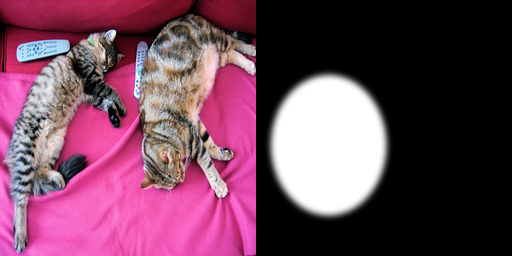
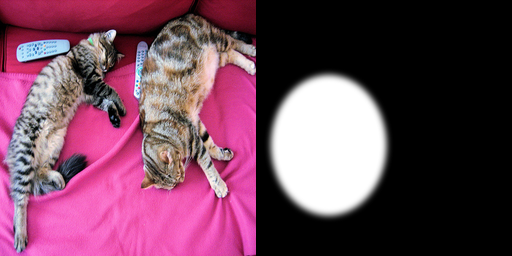
import urllib.requestimport numpy as npfrom IPython.display import displayfrom PIL import Image, ImageDraw, ImageFilter# The COCO cats image - the de-facto sample across these notebooks.SAMPLE = DATA_DIR /"coco_cats.jpg"ifnot SAMPLE.exists(): urllib.request.urlretrieve("http://images.cocodataset.org/val2017/000000039769.jpg", SAMPLE )# SD 1.5 works at 512x512; keep everything there so latencies are comparable.source = Image.open(SAMPLE).convert("RGB").resize((512, 512), Image.LANCZOS)# The edit we will ask every model for, expressed three ways (this distinction matters):INSTRUCTION ="make it a snowy winter scene"# for instruction editorsCAPTION_SRC ="a photo of two cats lying on a pink couch"# for CLIP directional simCAPTION_TGT ="a photo of two cats lying on a pink couch in a snowy winter scene"# img2img/ControlNet are NOT instruction models: they want a DESCRIPTION of the desired# result, not a command. Handing them "make it snowy" produces literal nonsense.def show(*images, size=256, labels=None):"Display PIL images side by side (ECharts cannot draw images; PIL is the right tool)." ims = [im.convert("RGB").resize((size, size), Image.LANCZOS) for im in images] strip = Image.new("RGB", (size *len(ims), size), "white")for i, im inenumerate(ims): strip.paste(im, (i * size, 0))if labels:print(" | ".join(f"{i +1}. {lab}"for i, lab inenumerate(labels))) display(strip)return strip# A mask over the left-hand cat: white = repaint, black = keep. Feathered, because a hard# 1-pixel mask edge is the classic source of an inpainting seam.mask = Image.new("L", source.size, 0)ImageDraw.Draw(mask).ellipse([30, 150, 260, 430], fill=255)mask = mask.filter(ImageFilter.GaussianBlur(6))show(source, mask, labels=["source (512x512)", "inpaint mask (white = repaint)"])
The SDEdit baseline: encode, noise, denoise with a prompt. stable-diffusion-v1-5/stable-diffusion-v1-5 is the live repo id - the original runwayml/stable-diffusion-v1-5 was deleted by Runway in August 2024, so any tutorial still using it fails at load. The community mirror under the stable-diffusion-v1-5 org (and sd-legacy) is the same weights.
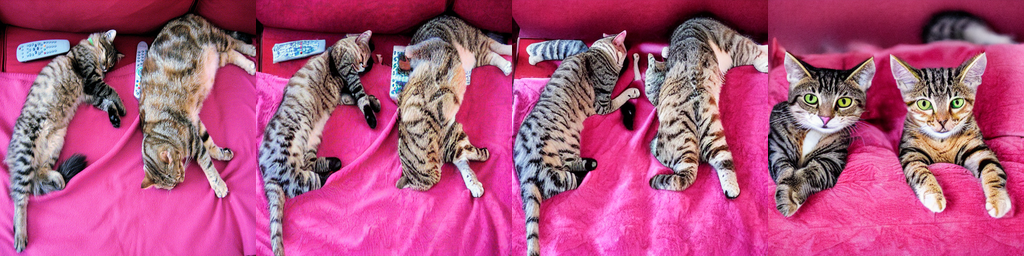
The cell below sweeps strength on the same seed so you can see the single most important behaviour in this notebook: the source dissolving as strength climbs, and the call getting slower at the same time (because steps executed = int(num_inference_steps * strength)).
from diffusers import StableDiffusionImg2ImgPipelinepipe = StableDiffusionImg2ImgPipeline.from_pretrained("stable-diffusion-v1-5/stable-diffusion-v1-5", torch_dtype=dtype, safety_checker=None, # the checker returns black images on false positives requires_safety_checker=False, cache_dir=HF_CACHE,)place(pipe)vram("sd15 img2img loaded")outs, labels = [source], ["source"]for strength in [0.3, 0.5, 0.75]: g = torch.Generator("cpu").manual_seed(0) # same seed -> the only variable is strength t0 = time.perf_counter() img = pipe( prompt=CAPTION_TGT, # a DESCRIPTION, not an instruction image=source, strength=strength, guidance_scale=7.5, num_inference_steps=40, # actual steps run = int(40 * strength) generator=g, ).images[0] dt = time.perf_counter() - t0print(f"strength={strength:.2f} steps_run={int(40* strength):2d}{dt:5.1f}s") outs.append(img) labels.append(f"strength={strength}")show(*outs, labels=labels)del pipefree_memory()vram("after sd15 img2img")
/home/bthek1/Knowledge/.venv/lib/python3.14/site-packages/diffusers/pipelines/pipeline_utils.py:2273: FutureWarning: `enable_vae_slicing` is deprecated and will be removed in version 0.40.0. Calling `enable_vae_slicing()` on a `StableDiffusionImg2ImgPipeline` is deprecated and this method will be removed in a future version. Please use `pipe.vae.enable_slicing()`.
  deprecate(
Adversarial Diffusion Distillation collapses the sampler to one step. For img2img that makes the constraint explicit: the pipeline runs int(num_inference_steps * strength) steps, so with num_inference_steps=2, strength=0.5 you get exactly 1 step - and if that product drops below 1 the pipeline runs zero steps and silently hands you back your input. guidance_scale=0.0 because Turbo was distilled without classifier-free guidance (passing a guidance scale makes it worse and twice as slow).
This is the model behind “restyle as you drag the slider” UIs. Licence is Stability’s non-commercial research licence - fine for a notebook, check it before shipping.
from diffusers import AutoPipelineForImage2Imagepipe = AutoPipelineForImage2Image.from_pretrained("stabilityai/sdxl-turbo", torch_dtype=dtype, variant="fp16"if device !="cpu"elseNone, cache_dir=HF_CACHE,)place(pipe)vram("sdxl-turbo loaded")# SDXL wants 512x512+ ; Turbo was trained at 512. num_inference_steps * strength >= 1.g = torch.Generator("cpu").manual_seed(0)t0 = time.perf_counter()turbo_out = pipe( prompt=CAPTION_TGT, image=source, strength=0.6, num_inference_steps=2, # 2 * 0.6 -> 1 actual denoising step guidance_scale=0.0, # ADD-distilled: CFG is not just unnecessary, it hurts generator=g,).images[0]print(f"sdxl-turbo: {time.perf_counter() - t0:.2f}s for 1 denoising step")show(source, turbo_out, labels=["source", "sdxl-turbo, 1 step"])del pipefree_memory()vram("after sdxl-turbo")
[transformers] `Siglip2ImageProcessorFast` is deprecated. The `Fast` suffix for image processors has been removed; use `Siglip2ImageProcessor` instead.
/home/bthek1/Knowledge/.venv/lib/python3.14/site-packages/huggingface_hub/utils/_validators.py:205: UserWarning: The `local_dir_use_symlinks` argument is deprecated and ignored in `hf_hub_download`. Downloading to a local directory does not use symlinks anymore.
  warnings.warn(
/home/bthek1/Knowledge/.venv/lib/python3.14/site-packages/diffusers/pipelines/pipeline_utils.py:2273: FutureWarning: `enable_vae_slicing` is deprecated and will be removed in version 0.40.0. Calling `enable_vae_slicing()` on a `StableDiffusionXLImg2ImgPipeline` is deprecated and this method will be removed in a future version. Please use `pipe.vae.enable_slicing()`.
  deprecate(
There are modules in AutoencoderKL that should be kept in float32: []. Casting directly with `to()` can lead to inconsistent results; set `torch_dtype` in `from_pretrained()` instead to keep these modules in float32.
There are modules in AutoencoderKL that should be kept in float32: []. Casting directly with `to()` can lead to inconsistent results; set `torch_dtype` in `from_pretrained()` instead to keep these modules in float32.
/home/bthek1/Knowledge/.venv/lib/python3.14/site-packages/diffusers/pipelines/stable_diffusion_xl/pipeline_stable_diffusion_xl_img2img.py:896: FutureWarning: `upcast_vae` is deprecated and will be removed in version 1.0.0. `upcast_vae` is deprecated. Please use `pipe.vae.to(torch.float32)`. For more details, please refer to: https://github.com/huggingface/diffusers/pull/12619#issue-3606633695.
  deprecate(
There are modules in AutoencoderKL that should be kept in float32: []. Casting directly with `to()` can lead to inconsistent results; set `torch_dtype` in `from_pretrained()` instead to keep these modules in float32.
There are modules in AutoencoderKL that should be kept in float32: []. Casting directly with `to()` can lead to inconsistent results; set `torch_dtype` in `from_pretrained()` instead to keep these modules in float32.
VRAM after sdxl-turbo 0.01 GB allocated / 0.02 GB reserved
10. Inpainting with a mask-conditioned checkpoint
stable-diffusion-v1-5/stable-diffusion-inpainting is the 9-channel U-Net described in section 3: noisy latent (4) + downsampled mask (1) + masked-image latent (4). Because the mask is an input, the model composes the fill against the visible context instead of being blended into it after the fact.
Two production details in the cell:
padding_mask_crop=32 crops to the mask (plus padding), inpaints at native resolution, and composites back - the fix for “my 4K photo got squashed to 512”.
Image.composite at the end forces the outside-mask pixels back to the byte-identical original, undoing the VAE round-trip. If your source is a real photograph in a real product, do this.
Outpainting is the same call: paste the source onto a larger canvas, mask everything that is new, and run.
from diffusers import StableDiffusionInpaintPipelinepipe = StableDiffusionInpaintPipeline.from_pretrained("stable-diffusion-v1-5/stable-diffusion-inpainting", torch_dtype=dtype, safety_checker=None, requires_safety_checker=False, cache_dir=HF_CACHE,)place(pipe)vram("sd15 inpaint loaded")g = torch.Generator("cpu").manual_seed(0)t0 = time.perf_counter()filled = pipe( prompt="a golden retriever puppy curled up asleep, photo", image=source, mask_image=mask, num_inference_steps=30, guidance_scale=7.5, strength=1.0, # inpainting: fully regenerate INSIDE the mask padding_mask_crop=32, # inpaint the masked crop at full res, then composite back generator=g,).images[0]print(f"inpaint: {time.perf_counter() - t0:.1f}s")# Force the untouched region back to the original pixels (kills the VAE round-trip drift).hard_mask = mask.point(lambda p: 255if p >127else0)composited = Image.composite(filled, source, hard_mask)show(source, mask, filled, composited, labels=["source", "mask", "inpainted", "composited back outside mask"])# Outpainting, same pipeline:# canvas = Image.new("RGB", (768, 512), "white"); canvas.paste(source, (128, 0))# omask = Image.new("L", (768, 512), 255); ImageDraw.Draw(omask).rectangle([128, 0, 639, 511], fill=0)# pipe(prompt="a wide shot of a living room", image=canvas, mask_image=omask, ...)del pipefree_memory()vram("after inpaint")
An error occurred while trying to fetch /home/bthek1/Knowledge/DL/DL_tasks/datasets/hf_cache/models--stable-diffusion-v1-5--stable-diffusion-inpainting/snapshots/8a4288a76071f7280aedbdb3253bdb9e9d5d84bb/unet: Error no file named diffusion_pytorch_model.safetensors found in directory /home/bthek1/Knowledge/DL/DL_tasks/datasets/hf_cache/models--stable-diffusion-v1-5--stable-diffusion-inpainting/snapshots/8a4288a76071f7280aedbdb3253bdb9e9d5d84bb/unet.
Defaulting to unsafe serialization. Pass `allow_pickle=False` to raise an error instead.
An error occurred while trying to fetch /home/bthek1/Knowledge/DL/DL_tasks/datasets/hf_cache/models--stable-diffusion-v1-5--stable-diffusion-inpainting/snapshots/8a4288a76071f7280aedbdb3253bdb9e9d5d84bb/vae: Error no file named diffusion_pytorch_model.safetensors found in directory /home/bthek1/Knowledge/DL/DL_tasks/datasets/hf_cache/models--stable-diffusion-v1-5--stable-diffusion-inpainting/snapshots/8a4288a76071f7280aedbdb3253bdb9e9d5d84bb/vae.
Defaulting to unsafe serialization. Pass `allow_pickle=False` to raise an error instead.
/home/bthek1/Knowledge/.venv/lib/python3.14/site-packages/diffusers/pipelines/pipeline_utils.py:2273: FutureWarning: `enable_vae_slicing` is deprecated and will be removed in version 0.40.0. Calling `enable_vae_slicing()` on a `StableDiffusionInpaintPipeline` is deprecated and this method will be removed in a future version. Please use `pipe.vae.enable_slicing()`.
  deprecate(
VRAM after inpaint 0.01 GB allocated / 0.02 GB reserved
11. InstructPix2Pix (instruction editing that fits)
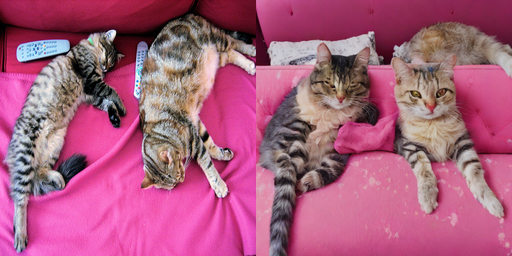
timbrooks/instruct-pix2pix (MIT, SD 1.5-sized) is the only instruction editor in this notebook that runs unquantised on a 12 GB card. It is 2023 technology and Qwen-Image-Edit-2511 embarrasses it - but it demonstrates the mechanism cleanly, and the two-guidance-scale API is the fidelity/adherence trade-off exposed as a dial:
guidance_scale (text, ~7.5): how hard to follow the instruction. Too low and nothing happens.
image_guidance_scale (~1.5): how hard to stay faithful to the source. Raise it and the edit gets timid; drop it to 1.0 and the model starts regenerating the picture.
No mask, no target caption - just a command. Note it takes the instruction, not the description we fed img2img.
from diffusers import StableDiffusionInstructPix2PixPipelinepipe = StableDiffusionInstructPix2PixPipeline.from_pretrained("timbrooks/instruct-pix2pix", torch_dtype=dtype, safety_checker=None, requires_safety_checker=False, cache_dir=HF_CACHE,)place(pipe)vram("instruct-pix2pix loaded")outs, labels = [source], ["source"]for img_gs in [1.0, 1.5, 2.0]: # sweep source-fidelity at fixed text guidance g = torch.Generator("cpu").manual_seed(0) t0 = time.perf_counter() img = pipe( prompt=INSTRUCTION, # an INSTRUCTION, not a description image=source, num_inference_steps=20, guidance_scale=7.5, # instruction adherence image_guidance_scale=img_gs, # source fidelity generator=g, ).images[0]print(f"image_guidance_scale={img_gs:.1f}{time.perf_counter() - t0:.1f}s") outs.append(img) labels.append(f"img_gs={img_gs}")show(*outs, labels=labels)print("Low image_guidance_scale -> bolder edit, more collateral damage. High -> timid but safe.")del pipefree_memory()vram("after instruct-pix2pix")
/home/bthek1/Knowledge/.venv/lib/python3.14/site-packages/diffusers/pipelines/pipeline_utils.py:2273: FutureWarning: `enable_vae_slicing` is deprecated and will be removed in version 0.40.0. Calling `enable_vae_slicing()` on a `StableDiffusionInstructPix2PixPipeline` is deprecated and this method will be removed in a future version. Please use `pipe.vae.enable_slicing()`.
  deprecate(
Low image_guidance_scale -> bolder edit, more collateral damage. High -> timid but safe.
VRAM after instruct-pix2pix  0.01 GB allocated /  0.02 GB reserved
12. ControlNet: keeping the composition, replacing everything else
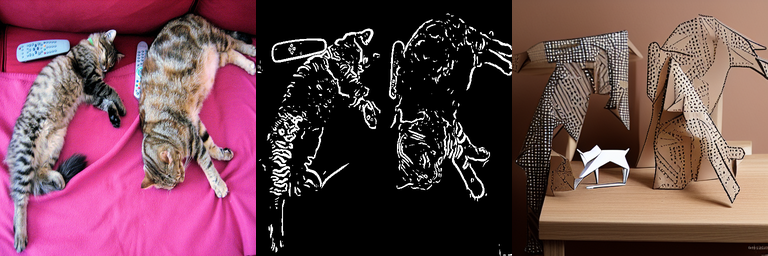
The zero-convolution adapter from section 3. We extract a Canny edge map from the source and hand it to lllyasviel/sd-controlnet-canny (v1.0; lllyasviel/control_v11p_sd15_canny is the v1.1 upgrade and the better default for new work) driving a frozen SD 1.5. The output shares the source’s geometry and nothing else - which is precisely what the concept-art use case in section 2 wants.
cv2.Canny is the canonical edge detector, but opencv-python may not be installed here, so the cell falls back to a Sobel-magnitude threshold via scipy.ndimage. The fallback edges are thicker (no non-maximum suppression), which mostly costs some fine detail - the ControlNet still tracks them. controlnet_conditioning_scale (0.0-1.0+) trades adherence to the edges against freedom for the prompt.
Swap the checkpoint for -depth, -openpose, -scribble, -seg and the API is identical; the conditioning maps come from the models in 00_Depth_Estimation, 17_Keypoint_Detection and 03_Image_Segmentation.
from diffusers import ControlNetModel, StableDiffusionControlNetPipeline, UniPCMultistepSchedulerdef edge_map(pil_img, low=100, high=200):"Canny edges via OpenCV if present, else a Sobel-magnitude threshold (scipy)." arr = np.array(pil_img.convert("RGB"))try:import cv2 edges = cv2.Canny(arr, low, high)exceptImportError:from scipy.ndimage import gaussian_filter, sobel gray = gaussian_filter(np.array(pil_img.convert("L"), dtype=np.float32), 1.4) mag = np.hypot(sobel(gray, axis=0), sobel(gray, axis=1)) edges = (mag > np.percentile(mag, 92)).astype(np.uint8) *255# ~8% of pixels are edgesreturn Image.fromarray(np.stack([edges] *3, axis=-1)) # ControlNet wants 3 channelscanny = edge_map(source)controlnet = ControlNetModel.from_pretrained("lllyasviel/sd-controlnet-canny", torch_dtype=dtype, cache_dir=HF_CACHE)pipe = StableDiffusionControlNetPipeline.from_pretrained("stable-diffusion-v1-5/stable-diffusion-v1-5", controlnet=controlnet, torch_dtype=dtype, safety_checker=None, requires_safety_checker=False, cache_dir=HF_CACHE,)# UniPC gets usable samples in ~20 steps instead of 50.pipe.scheduler = UniPCMultistepScheduler.from_config(pipe.scheduler.config)place(pipe)vram("controlnet loaded")g = torch.Generator("cpu").manual_seed(0)t0 = time.perf_counter()cn_out = pipe( prompt="two origami cats on a wooden bench, paper craft, studio lighting", negative_prompt="blurry, lowres, deformed", image=canny, # the CONDITIONING map, not the source photo num_inference_steps=20, controlnet_conditioning_scale=1.0, # lower -> looser adherence to the edges generator=g,).images[0]print(f"controlnet: {time.perf_counter() - t0:.1f}s")show(source, canny, cn_out, labels=["source", "canny edges", "controlnet output"])del pipe, controlnetfree_memory()vram("after controlnet")
/home/bthek1/Knowledge/.venv/lib/python3.14/site-packages/diffusers/pipelines/pipeline_utils.py:2273: FutureWarning: `enable_vae_slicing` is deprecated and will be removed in version 0.40.0. Calling `enable_vae_slicing()` on a `StableDiffusionControlNetPipeline` is deprecated and this method will be removed in a future version. Please use `pipe.vae.enable_slicing()`.
  deprecate(
VRAM after controlnet 0.01 GB allocated / 0.02 GB reserved
13. Super-resolution with Swin2SR (transformers-native)
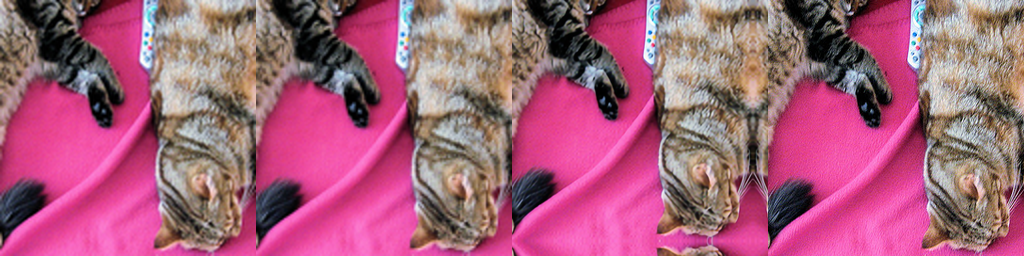
A different sub-task entirely: no prompt, no diffusion, a deterministic 12M-parameter SwinV2 transformer that maps a low-res image to a 2x one (caidas/swin2SR-classical-sr-x2-64, Apache-2.0, loaded through transformers’ AutoModelForImageToImage). It is the right tool when you must not invent detail - and the wrong one when you want invented detail, which is what SUPIR/SeeSR/OSEDiff’s diffusion priors are for.
We downscale the source 4x to fabricate a low-res input, upscale it 2x, and score PSNR/SSIM against a bicubic baseline at the same size. Watch the trap from section 4 play out: the metrics are close, and the perceptual gap is much larger than the dB gap suggests.
Run it in fp32 (12M params - the memory is free, and Swin window attention is happier in fp32), on a crop, because self-attention over a full 512x512 image is quadratic and needlessly slow on 4 cores.
from transformers import AutoImageProcessor, AutoModelForImageToImagehr = source.crop((128, 128, 384, 384)) # 256x256 ground truthlr = hr.resize((128, 128), Image.BICUBIC) # the degraded input (2x down)bicubic = lr.resize((256, 256), Image.BICUBIC) # the baseline to beatsr_id ="caidas/swin2SR-classical-sr-x2-64"processor = AutoImageProcessor.from_pretrained(sr_id, cache_dir=HF_CACHE)sr_model = AutoModelForImageToImage.from_pretrained(sr_id, cache_dir=HF_CACHE).to(device).eval()inputs = processor(lr, return_tensors="pt").to(device)t0 = time.perf_counter()with torch.inference_mode(): out = sr_model(**inputs).reconstruction # (1, 3, H*2, W*2), float in [0, 1]print(f"swin2sr: {time.perf_counter() - t0:.2f}s {tuple(inputs['pixel_values'].shape[-2:])} -> {tuple(out.shape[-2:])}")arr = out.squeeze(0).float().clamp(0, 1).cpu().numpy().transpose(1, 2, 0)sr = Image.fromarray((arr *255).round().astype(np.uint8)).resize(hr.size, Image.BICUBIC)# Score both against the ground truth, on the luma channel (the SR convention).def luma(im):return np.asarray(im.convert("L"), dtype=np.float64) /255.0for name, im in [("bicubic x2", bicubic), ("swin2sr x2", sr)]:print(f"{name:12s} PSNR {psnr(luma(hr), luma(im)):5.2f} dB SSIM {ssim(luma(hr), luma(im)):.4f}")show(lr, bicubic, sr, hr, labels=["low-res input", "bicubic", "swin2sr", "ground truth"])del sr_model, processor, inputs, outfree_memory()vram("after swin2sr")
VRAM after swin2sr 0.01 GB allocated / 0.02 GB reserved
14. Head-to-head Benchmark
Same source image, same intended edit, three editors that fit on the card, loaded and freed one at a time:
Model
How the edit is expressed
instruct-pix2pix
the instruction (“make it a snowy winter scene”)
sd15 img2img (strength 0.5)
the target caption (img2img cannot follow commands)
sdxl-turbo img2img (1 step)
the target caption
Two metrics, because - per section 4 - either one alone is meaningless:
Instruction adherence = CLIP directional similarity between the image-space edit vector and the text-space caption vector. Higher = the edit went where it was asked.
Source preservation = CLIP image-image cosine between source and edit. Higher = less collateral damage.
The 2-D scatter of those two axes is the honest summary: the top-right corner is a good editor, the bottom-right is a model that did nothing, and the top-left is a model that threw your photo away and generated a new one. Plus a wall-clock bar.
Hardware: RTX 3060 12 GB (fp16, model CPU offload), 512x512, n = 1 image. That is a smoke test, not a leaderboard - a real number needs MagicBrush or GEdit-Bench with a VLM judge over thousands of examples, and the ranking below can flip on a different image.
There are modules in AutoencoderKL that should be kept in float32: []. Casting directly with `to()` can lead to inconsistent results; set `torch_dtype` in `from_pretrained()` instead to keep these modules in float32.
There are modules in AutoencoderKL that should be kept in float32: []. Casting directly with `to()` can lead to inconsistent results; set `torch_dtype` in `from_pretrained()` instead to keep these modules in float32.
There are modules in AutoencoderKL that should be kept in float32: []. Casting directly with `to()` can lead to inconsistent results; set `torch_dtype` in `from_pretrained()` instead to keep these modules in float32.
There are modules in AutoencoderKL that should be kept in float32: []. Casting directly with `to()` can lead to inconsistent results; set `torch_dtype` in `from_pretrained()` instead to keep these modules in float32.
# Pass 2: score the (small) PIL outputs with CLIP. The pipelines are already gone,# so only one model is live at a time - CLIP ViT-B/32 is ~150M params, trivial here.from transformers import CLIPModel, CLIPProcessorclip_id ="openai/clip-vit-base-patch32"clip = CLIPModel.from_pretrained(clip_id, cache_dir=HF_CACHE).to(device).eval()clip_proc = CLIPProcessor.from_pretrained(clip_id, cache_dir=HF_CACHE)@torch.inference_mode()def img_embed(pil): x = clip_proc(images=pil, return_tensors="pt").to(device)return clip.get_image_features(**x).pooler_output[0].float().cpu().numpy()@torch.inference_mode()def txt_embed(text): x = clip_proc(text=[text], return_tensors="pt", padding=True, truncation=True).to(device)return clip.get_text_features(**x).pooler_output[0].float().cpu().numpy()e_src = img_embed(source)t_src, t_tgt = txt_embed(CAPTION_SRC), txt_embed(CAPTION_TGT)rows = []for name, img in edits.items(): e_edit = img_embed(img) rows.append({"model": name,"adherence": round(clip_directional(e_src, e_edit, t_src, t_tgt), 4), # sec-4 helper"preservation": round(cos(e_src, e_edit), 4),"seconds": round(timings[name], 2), })# A no-op "editor" as the control: it pins the bottom-right corner of the scatter.rows.append({"model": "identity (no edit)", "adherence": 0.0,"preservation": 1.0, "seconds": 0.0})del clip, clip_procfree_memory()vram("after clip")import pandas as pddf = pd.DataFrame(rows).sort_values("adherence", ascending=False).reset_index(drop=True)df
VRAM after clip 0.01 GB allocated / 0.02 GB reserved
model
adherence
preservation
seconds
0
instruct-pix2pix
0.0722
0.9490
4.20
1
sd15-img2img-s0.5
0.0338
0.8846
3.30
2
sdxl-turbo-1step
0.0058
0.8414
6.87
3
identity (no edit)
0.0000
1.0000
0.00
from pyecharts import options as optsfrom pyecharts.charts import Scatter# The trade-off plot: x = source preservation, y = instruction adherence.# top-right = good edit | bottom-right = did nothing | top-left = regenerated the imagexs = [float(r["preservation"]) for r in rows]scatter = Scatter()scatter.add_xaxis(xaxis_data=[round(x, 4) for x in xs])for i, r inenumerate(rows): ys = [None] *len(rows) ys[i] =round(float(r["adherence"]), 4) scatter.add_yaxis( series_name=r["model"], y_axis=ys, symbol_size=18, label_opts=opts.LabelOpts(is_show=False), )scatter.set_global_opts( title_opts=opts.TitleOpts( title="Editing trade-off: adherence vs preservation", subtitle="n=1 image, RTX 3060, CLIP ViT-B/32. Neither axis means anything alone.", ), xaxis_opts=opts.AxisOpts(type_="value", name="source preservation (CLIP img-img cos)", min_=0.5, max_=1.02, splitline_opts=opts.SplitLineOpts(is_show=True)), yaxis_opts=opts.AxisOpts(type_="value", name="instruction adherence (CLIP directional)", splitline_opts=opts.SplitLineOpts(is_show=True)), tooltip_opts=opts.TooltipOpts(trigger="item", formatter="{a}: ({c})"), legend_opts=opts.LegendOpts(pos_top="8%"),)scatter.render_notebook()
from pyecharts.charts import Barbar = ( Bar() .add_xaxis([r["model"] for r in rows if r["seconds"] >0]) .add_yaxis("seconds / image", [r["seconds"] for r in rows if r["seconds"] >0]) .set_global_opts( title_opts=opts.TitleOpts(title="Latency (512x512, fp16, model CPU offload)"), xaxis_opts=opts.AxisOpts(name="model", axislabel_opts=opts.LabelOpts(rotate=20)), yaxis_opts=opts.AxisOpts(name="seconds"), tooltip_opts=opts.TooltipOpts(trigger="axis"), ))bar.render_notebook()
15. Interactive Demo: restyle the webcam live
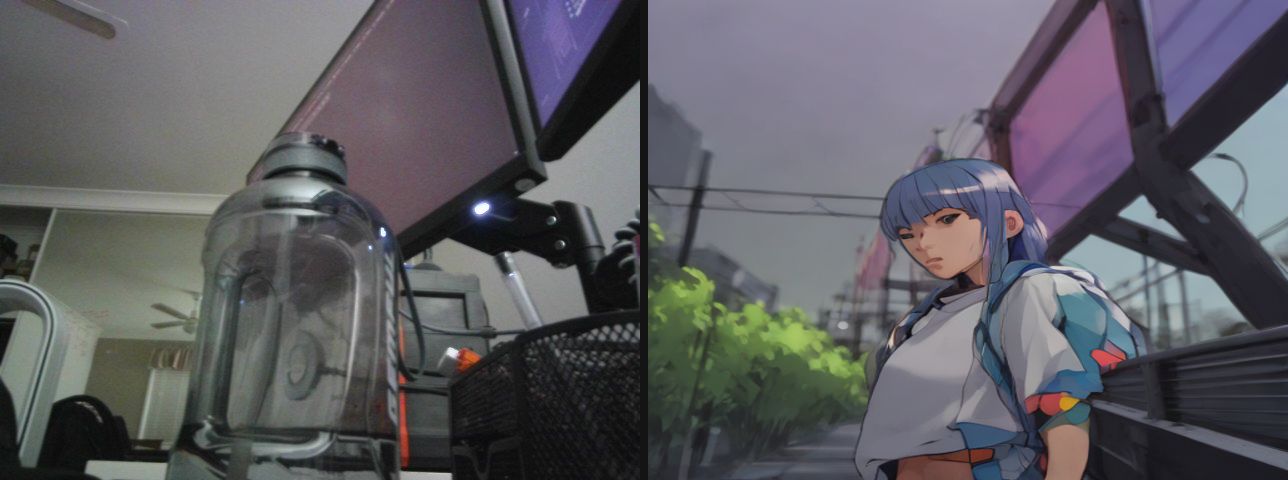
SDXL-Turbo at two steps is fast enough to sit inside an interactive loop - grab a frame, restyle it, show it, repeat. This is the “drag the slider” product from section 2, running against the actual camera: raw on the left, restyled on the right, updating as fast as the GPU can turn them around.
Expect roughly one frame a second, not 15. Watch what happens between frames: the same prompt and the same seed still give a different painting each time, because the input frame moved slightly. That instability is the entire subject of 18_Video_to_Video.
The view is live: the left pane is the raw camera, the right pane is the same frame after the model, and both update in place through a display handle - no cv2.imshow, no GUI, so it works over JupyterLab against a headless container. A status line underneath carries the running FPS and the per-frame numbers. It runs for STREAM_SECONDS seconds; interrupt the kernel to stop it early.
Two things throttle the frame rate before the model does, both measured on this machine: auto-exposure drops the sensor to 15 FPS in a dim room (take exposure off auto to pin 30), and setting CAP_PROP_BUFFERSIZEhalves the delivered rate on the V4L2 backend, so the helper deliberately does not set it.
Needs a real camera at /dev/video0 - the cell raises rather than substituting stand-in images. The docs builder never runs it (skip_exec: true).
# opencv-python-headless is a project dependency; the headless build captures from# V4L2 fine, it only drops the GUI windows.import ioimport timeimport cv2import numpy as npimport torchfrom IPython.display import Image as IPyImagefrom IPython.display import Pretty, displayfrom PIL import Image, ImageDraw, ImageFontCAM =0# /dev/video0WARMUP =10# throwaway reads - auto-exposure and white balance need to settleSTREAM_SECONDS =15# how long a live demo runs; interrupt the kernel to stop earlydef bootstrap(*names, notebook, sections):"""Make this demo runnable on a cold kernel, without duplicating the notebook. The demo builds on the notebook's setup and helper cells. Instead of making you run them by hand - or copying them in here and letting the copies drift - this reads the notebook file and executes those sections itself, and only when a name is actually missing. Run the notebook top to bottom and it does nothing at all. It stops as soon as every required name exists, so trailing benchmark cells in a section are not run. """ifall(n inglobals() for n in names):returnimport jsonfrom pathlib import Pathfrom IPython.utils.capture import capture_output path = Path(notebook)ifnot path.exists():raiseNameError(f"this demo needs {', '.join(n for n in names if n notinglobals())}, and cannot "f"find {notebook} to bootstrap from (cwd is {Path.cwd()}, expected the notebook's "f"own directory). Run section(s) {'; '.join(sections)} by hand instead." )print(f"cold start: running {'; '.join(sections)} from {notebook} (output suppressed)") heading =Nonefor cell in json.loads(path.read_text())["cells"]: src ="".join(cell["source"])if cell["cell_type"] =="markdown"and src.lstrip().startswith("## "): heading = src.lstrip().splitlines()[0][3:].strip()continueif cell["cell_type"] !="code"ornot heading or"def bootstrap("in src:continueifnotany(heading.startswith(s) for s in sections):continue code ="".join(""if l.lstrip().startswith(("%", "!")) else lfor l in src.splitlines(keepends=True))# The setup cells print tables and display sample images. This demo only# wants the live stream, so swallow their output - errors still propagate.with capture_output():exec(compile(code, f"{notebook} [{heading}]", "exec"), globals())ifall(n inglobals() for n in names):break still = [n for n in names if n notinglobals()]if still:raiseNameError(f"bootstrapped {'; '.join(sections)} but {', '.join(still)} ""are still undefined - the notebook layout may have changed.")def open_camera(index=CAM, width=640, height=480, auto_exposure=True, exposure=150):"Open a V4L2 webcam in MJPEG mode, let it settle, and return the capture handle." cap = cv2.VideoCapture(index, cv2.CAP_V4L2)ifnot cap.isOpened():raiseRuntimeError(f"/dev/video{index} did not open - no camera attached, ""or it is not passed through into this container" ) cap.set(cv2.CAP_PROP_FOURCC, cv2.VideoWriter.fourcc(*"MJPG")) # MJPEG unlocks the higher modes cap.set(cv2.CAP_PROP_FRAME_WIDTH, width) cap.set(cv2.CAP_PROP_FRAME_HEIGHT, height)# UVC exposure is DEVICE state and persists between processes: if anything left# this camera in manual mode, every frame comes back dark and never adapts# (measured here: mean 13/255 stuck, vs 109/255 on auto). So ask for the mode# explicitly instead of inheriting whatever the last program set.# auto (3): correct brightness, but a dim room throttles the sensor to 15 FPS# manual (1): locked 30 FPS, at whatever `exposure` level suits your lighting cap.set(cv2.CAP_PROP_AUTO_EXPOSURE, 3if auto_exposure else1)ifnot auto_exposure: cap.set(cv2.CAP_PROP_EXPOSURE, exposure)# Deliberately no CAP_PROP_BUFFERSIZE: on the V4L2 backend it HALVES the# delivered frame rate (measured here: 67 -> 134 ms per read) and does not make# frames any fresher.for _ inrange(WARMUP):ifnot cap.read()[0]: cap.release()raiseRuntimeError(f"/dev/video{index} opened but delivered no frames")return capdef grab(cap):"Read one frame off an open camera as an RGB PIL image (OpenCV hands back BGR)." ok, frame = cap.read()ifnot ok:raiseRuntimeError("failed to read a frame")return Image.fromarray(cv2.cvtColor(frame, cv2.COLOR_BGR2RGB))def capture_frame(**kw):"Open the camera, grab one settled frame, and release the device." cap = open_camera(**kw)try:return grab(cap)finally: cap.release()_FONT = ImageFont.load_default(size=15)def draw_lines(img, lines, pad=6):"Burn a few lines of text into a band across the top of a copy of `img`." out = img.convert("RGB").copy() d = ImageDraw.Draw(out) d.rectangle([0, 0, out.width, 18*len(lines) +2* pad], fill=(0, 0, 0))for i, line inenumerate(lines): d.text((pad, pad +18* i), line, fill=(255, 255, 255), font=_FONT)return outdef pair_view(left, right, gap=8):"Raw frame and annotated frame side by side on one canvas - the live view." right = right.convert("RGB")if right.size != left.size: right = right.resize(left.size) canvas = Image.new("RGB", (left.width *2+ gap, left.height), (20, 20, 20)) canvas.paste(left.convert("RGB"), (0, 0)) canvas.paste(right, (left.width + gap, 0))return canvasdef _jpeg(img, quality=80):"Encode a PIL image to JPEG bytes - what actually goes over the wire each frame." buf = io.BytesIO() img.convert("RGB").save(buf, format="JPEG", quality=quality)return buf.getvalue()def live_stream(annotate, seconds=STREAM_SECONDS, width=640, height=480):"""Stream `raw | annotated` into the notebook output until `seconds` elapse. `annotate(rgb)` returns `(annotated_image, info_string)`. The image and the status line each own a display handle and update in place, so this needs no GUI and no `cv2.imshow` - it works over JupyterLab against a headless container. Interrupt the kernel (the stop button) to end early; the camera is still released. """ cap = open_camera(width=width, height=height) view = status =None# created from the FIRST real frame, so no placeholder flashes up n, t0 =0, time.perf_counter()try:while time.perf_counter() - t0 < seconds: rgb = grab(cap) annotated, info = annotate(rgb) n +=1 frame = IPyImage(data=_jpeg(pair_view(rgb, annotated))) line = Pretty(f"frame {n:4d}{n / (time.perf_counter() - t0):5.1f} FPS {info}")if view isNone: view = display(frame, display_id=True) status = display(line, display_id=True)else: view.update(frame) status.update(line)exceptKeyboardInterrupt:if status isnotNone: status.update(Pretty(f"stopped at frame {n}"))finally: cap.release() # always hand the device back elapsed = time.perf_counter() - t0print(f"{n} frames in {elapsed:.1f}s -> {n /max(elapsed, 1e-9):.1f} FPS end-to-end ""(camera + model + JPEG encode)")def preview(seconds=5, width=640, height=480):"Stream the raw camera so you can frame the shot, then return the final frame." cap = open_camera(width=width, height=height) view = status =None# created from the FIRST real frame, so no placeholder flashes up last, n, t0 =None, 0, time.perf_counter()try:while time.perf_counter() - t0 < seconds: last = grab(cap) n +=1 frame = IPyImage(data=_jpeg(last)) line = Pretty(f"framing - {seconds - (time.perf_counter() - t0):4.1f}s left, "f"{n} frames (the last one is the one that gets used)")if view isNone: view = display(frame, display_id=True) status = display(line, display_id=True)else: view.update(frame) status.update(line)exceptKeyboardInterrupt:passfinally: cap.release()if status isnotNone: status.update(Pretty(f"captured the last of {n} frames"))return lastfrom diffusers import AutoPipelineForImage2Image# Everything below builds on the notebook's setup and helper cells.bootstrap("device", "dtype", "HF_CACHE", "place", "free_memory", "vram", notebook="06_Image_to_Image.ipynb", sections=["7. Setup"])pipe = AutoPipelineForImage2Image.from_pretrained("stabilityai/sdxl-turbo", torch_dtype=dtype, variant="fp16"if device !="cpu"elseNone, cache_dir=HF_CACHE)place(pipe)PROMPT ="colourful anime style"def annotate(rgb):"One frame -> (the restyled frame, how long the restyle took)." t0 = time.perf_counter() styled = pipe( prompt=PROMPT, image=rgb.resize((512, 512)), strength=0.6, num_inference_steps=2, guidance_scale=0.0, generator=torch.Generator("cpu").manual_seed(0), ).images[0]return styled, f"restyle {time.perf_counter() - t0:.2f}s \"{PROMPT[:40]}\""live_stream(annotate)del pipefree_memory()vram("final")
offload: model-level (11.8 GB VRAM free)
There are modules in AutoencoderKL that should be kept in float32: []. Casting directly with `to()` can lead to inconsistent results; set `torch_dtype` in `from_pretrained()` instead to keep these modules in float32.
There are modules in AutoencoderKL that should be kept in float32: []. Casting directly with `to()` can lead to inconsistent results; set `torch_dtype` in `from_pretrained()` instead to keep these modules in float32.
There are modules in AutoencoderKL that should be kept in float32: []. Casting directly with `to()` can lead to inconsistent results; set `torch_dtype` in `from_pretrained()` instead to keep these modules in float32.
There are modules in AutoencoderKL that should be kept in float32: []. Casting directly with `to()` can lead to inconsistent results; set `torch_dtype` in `from_pretrained()` instead to keep these modules in float32.
There are modules in AutoencoderKL that should be kept in float32: []. Casting directly with `to()` can lead to inconsistent results; set `torch_dtype` in `from_pretrained()` instead to keep these modules in float32.
There are modules in AutoencoderKL that should be kept in float32: []. Casting directly with `to()` can lead to inconsistent results; set `torch_dtype` in `from_pretrained()` instead to keep these modules in float32.
There are modules in AutoencoderKL that should be kept in float32: []. Casting directly with `to()` can lead to inconsistent results; set `torch_dtype` in `from_pretrained()` instead to keep these modules in float32.
There are modules in AutoencoderKL that should be kept in float32: []. Casting directly with `to()` can lead to inconsistent results; set `torch_dtype` in `from_pretrained()` instead to keep these modules in float32.
There are modules in AutoencoderKL that should be kept in float32: []. Casting directly with `to()` can lead to inconsistent results; set `torch_dtype` in `from_pretrained()` instead to keep these modules in float32.
There are modules in AutoencoderKL that should be kept in float32: []. Casting directly with `to()` can lead to inconsistent results; set `torch_dtype` in `from_pretrained()` instead to keep these modules in float32.
There are modules in AutoencoderKL that should be kept in float32: []. Casting directly with `to()` can lead to inconsistent results; set `torch_dtype` in `from_pretrained()` instead to keep these modules in float32.
There are modules in AutoencoderKL that should be kept in float32: []. Casting directly with `to()` can lead to inconsistent results; set `torch_dtype` in `from_pretrained()` instead to keep these modules in float32.
There are modules in AutoencoderKL that should be kept in float32: []. Casting directly with `to()` can lead to inconsistent results; set `torch_dtype` in `from_pretrained()` instead to keep these modules in float32.
There are modules in AutoencoderKL that should be kept in float32: []. Casting directly with `to()` can lead to inconsistent results; set `torch_dtype` in `from_pretrained()` instead to keep these modules in float32.
There are modules in AutoencoderKL that should be kept in float32: []. Casting directly with `to()` can lead to inconsistent results; set `torch_dtype` in `from_pretrained()` instead to keep these modules in float32.
There are modules in AutoencoderKL that should be kept in float32: []. Casting directly with `to()` can lead to inconsistent results; set `torch_dtype` in `from_pretrained()` instead to keep these modules in float32.
There are modules in AutoencoderKL that should be kept in float32: []. Casting directly with `to()` can lead to inconsistent results; set `torch_dtype` in `from_pretrained()` instead to keep these modules in float32.
There are modules in AutoencoderKL that should be kept in float32: []. Casting directly with `to()` can lead to inconsistent results; set `torch_dtype` in `from_pretrained()` instead to keep these modules in float32.
There are modules in AutoencoderKL that should be kept in float32: []. Casting directly with `to()` can lead to inconsistent results; set `torch_dtype` in `from_pretrained()` instead to keep these modules in float32.
There are modules in AutoencoderKL that should be kept in float32: []. Casting directly with `to()` can lead to inconsistent results; set `torch_dtype` in `from_pretrained()` instead to keep these modules in float32.
5 frames in 15.8s -> 0.3 FPS end-to-end (camera + model + JPEG encode)
VRAM final                 0.01 GB allocated /  0.02 GB reserved
16. Common Frameworks
Image-to-image is the task where the pipeline matters more than the model. Almost nothing above is one call: a real edit is a mask from a segmenter, a conditioning map from a depth or pose model, a base generator, and an upscaler. That makes the graph tooling and the conditioning producers as important as diffusers itself, and it is why ComfyUI has a stronger claim here than in any other notebook in this folder.
Distance from the source and agreement with the instruction - editing needs both, and they trade off
Apache 2.0
Comparing editors. A model that changes nothing scores perfectly on preservation alone
The 2026 default stack is diffusers plus ControlNet and IP-Adapter, SAM for masks, ComfyUI for the graph once there is more than one stage, and a distilled base model if a human is waiting. Fine-tuning enters only when the same edit repeats.
The common wrong turn is trying to get structural control out of a prompt. The strength knob from section 8 trades preservation against change along one axis, and past a point there is no setting that keeps the composition and changes the style - that is what ControlNet exists for. The second is reporting only one side of the trade: preservation and instruction-following must be measured together or the numbers are meaningless.
17. Going Further
Fine-tuning an editor. The diffusers InstructPix2Pix training script fine-tunes on your own triplets; MagicBrush is the standard set for making a synthetic-trained editor work on real photos. For the DiT editors, LoRA on FLUX.1 Kontext or Qwen-Image-Edit is the practical path (Qwen-Image-Edit-2511 ships with integrated LoRA support) - a few hundred triplets teach a specific edit (a brand style, a product transform) far better than prompt engineering.
Training a ControlNet.train_controlnet.py - ~50k conditioning/image pairs and a single GPU is genuinely enough, thanks to the zero-convs. Build the conditioning maps with the models from 00_Depth_Estimation / 17_Keypoint_Detection.
Better masks. Hand-drawn ellipses are a demo. In production the mask comes from SAM/SAM 2 (12_Mask_Generation) or from a grounded detector (13_Zero_Shot_Object_Detection) - “click the cat, remove the cat” is a two-model pipeline.
IP-Adapter for subject/style without any training: pipe.load_ip_adapter("h94/IP-Adapter", subfolder="models", weight_name="ip-adapter_sd15.bin"), then pipe(..., ip_adapter_image=reference). 22M params, works with every pipeline above (including inpainting and ControlNet, stacked).
Related notebooks.04_Text_to_Image (the base models), 12_Mask_Generation (masks), 00_Depth_Estimation (ControlNet conditioning), 16_Image_Feature_Extraction (the CLIP/DINO embeddings behind the metrics), 07_Image_to_Video and 18_Video_to_Video (the same conditioning problem in time).